

What features should good accounting software offer?
Comparing is worthwhile
What is the purpose of accounting software in an SME?
Accounting software helps businesses maintain a clear financial overview of all transactions while streamlining bookkeeping processes. It plays a key role in safeguarding a company’s financial integrity, ensuring regulatory compliance, supporting informed decision-making, and improving overall efficiency in financial management.
How does an SME benefit from good accounting software?
Where traditional accounting solutions reach their limits, our ERP Cloud solution provides a modern, scalable accounting system designed to grow with your business from day one. Developed specifically for the needs of Swiss SMEs, it combines flexibility with reliability.
With Microsoft Dynamics 365 Business Central, you can manage your accounting efficiently and effortlessly. Automated processes ensure compliance, enhance transparency, and bring consistency to your financial operations. Discover how Microsoft Dynamics 365 Business Central helps your company reduce errors, save valuable time, and gain full confidence in your bookkeeping.
What are the most important features of good accounting software?
We asked our project managers: Which features of Microsoft Dynamics 365 Business Central save the most time in accounting? Which functions have become indispensable for accountants in their daily work? Here are three features that Swiss accountants value most in Microsoft Dynamics 365 Business Central.
User-friendliness and advanced filter options
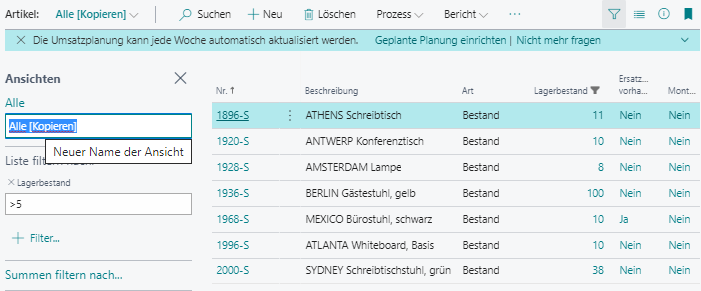
Finding, filtering, and sorting data efficiently is essential for a smooth user experience. With Microsoft Dynamics 365 Business Central, powerful filter functions allow you to compile evaluations quickly and easily—without creating a separate report. Individual filter views can be saved and accessed at any time, giving users flexibility and speed. This feature saves accounting teams valuable time every day and ensures that data is always just a few clicks away.
Search function
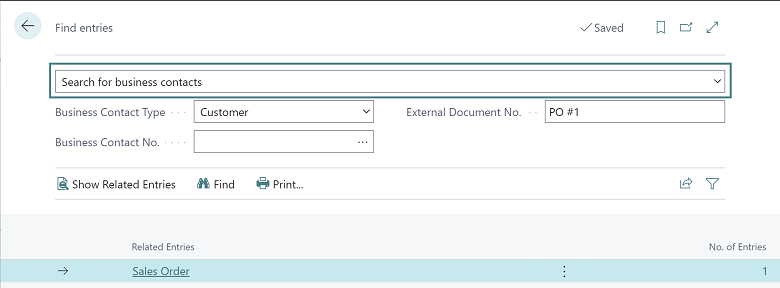
Need to check the status of an order, find a supplier invoice by its number, or track an item using its serial number? The search function in Microsoft Dynamics 365 Business Central makes it simple. It allows you to display posted documents and their related entries instantly. With just one click on the relevant line, all associated details appear—giving you quick access to the information you need.
For example, users can easily verify how a transaction was posted and provide customers with accurate invoice details in seconds. The search function is available across all documents, ensuring that with minimal effort, you gain a complete overview whenever you need it.
Export to Excel and re-import into ERP software
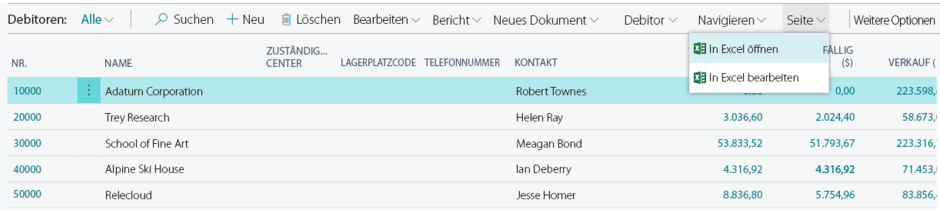
For many users, Excel is an essential tool for filtering, sorting, comparing, and analyzing data. In accounting, it is particularly valuable as the foundation for queries, comparisons, and spreadsheets. This is where Microsoft Dynamics 365 Business Central truly stands out.
With Dynamics 365 Business Central, all lists and standard reports can be exported to Excel with a single click for further processing. Users can conveniently update addresses, products, and items, as well as edit budget entries and accounting records. Exporting even works via simple copy and paste. Once changes are made, the updated lists can be seamlessly imported back into Microsoft Dynamics 365 Business Central—saving time and ensuring accuracy.
What are the advantages of Microsoft Dynamics 365 in the financial sector?
Discover what modern accounting software can do—and how your company or finance team can benefit.
Track financial transactions
- Accounting software enables businesses to monitor all financial transactions, including income, expenses, loans, and payments. This makes recording and tracking financial activities simple and reliable.
Bookkeeping and reporting
- The software supports the creation of essential financial reports such as balance sheets, profit and loss statements, and cash flow statements. These reports are critical for assessing a company’s financial health and making informed business decisions.
Tax management
- Accounting software helps organize and prepare tax-related data, making compliance easier and reducing the risk of errors in tax returns.
Invoice creation
- Generate invoices quickly and easily to track payments and ensure outstanding invoices are settled promptly—improving cash flow and customer communication.
Cost tracking
- SMEs can monitor expenses more effectively, stay within budget, and identify potential savings—crucial for maintaining profitability.
Financial analysis
- The software helps companies analyze key financial metrics and trends, enabling SME executives and finance managers to make informed decisions and improve overall financial performance.
Compliance and audit-ready documentation
- Accounting software ensures compliance with legal requirements and facilitates efficient archiving of financial documents—crucial during audits and inspections. All relevant documents are securely stored in the cloud in an audit-proof manner.
Time savings
- By automating recurring tasks such as data entry and tax calculations, accounting software saves Swiss companies significant time while reducing the risk of human error.
How Does an automated accounts payable workflow work in accounting?
From invoice entry to approval, automating your accounts payable process can significantly simplify life for your accounting team. Here’s how the workflow works in solutions like Microsoft Dynamics 365 Business Central:
Optical Character Recognition (OCR)
Say goodbye to tedious manual data entry. With integrated OCR technology, Microsoft Dynamics 365 Business Central automatically detects text on original documents and populates the relevant fields in the system. This reduces errors and saves valuable time for your accounting staff.
Reconciliation and automatic approval
Want to automatically approve invoices up to a certain limit? No problem. Simply set your threshold, and the software handles the rest. Invoices are automatically reconciled and approved—provided they meet all verification criteria—streamlining your approval process and ensuring compliance.
Approval workflow
Microsoft’s accounting solution streamlines the approval process by automatically routing documents through predefined workflows—accelerating approvals and reducing manual effort. You can access these workflows and approve entries anytime, anywhere, ensuring you always have a clear overview of your company’s income and expenses.
Compliant archiving and audit security
With Microsoft’s accounting software, your company can maintain the security and integrity of all accounting documents in their original digital form—fully meeting legal requirements. The system automatically records the complete history of each document, from receipt to final posting, creating transparency and ensuring audit readiness.
Complete control over your financial accounting
With Microsoft’s accounting software, you can monitor your income and expenses at any time—and in real time. Access live data on bookings, revenue, profits, and other key financial metrics whenever you need them. The system also provides clear, informative reports, making it easy to share financial insights and essential data with your team.
Modern business software ensures full visibility of your accounting processes. Core functions such as double-entry bookkeeping and VAT accounting are always available, giving you complete control over your online accounting.
Security is guaranteed on multiple levels: the solution incorporates advanced technology and high security standards to keep your data safe at all times. Its intuitive design and automation capabilities not only minimize human error but also give employees confidence and peace of mind—making financial management easier and more reliable.
Save time and money efficiently
Microsoft Dynamics 365 Business Central offers a wide range of accounting features designed to help your company work efficiently and conserve resources in daily operations. From automated data entry and seamless Excel import/export to automated accounts payable workflows, the software simplifies complex tasks. Additional tools such as advanced search and filter options, integrated tax calculation, and automatic reporting further enhance productivity.
These features not only save time and reduce costs but also help optimize your balance sheet and keep your financial data clear and accessible at all times.
Professional support
At Aproda, you benefit from first-class professional support provided by our expert and dedicated team. Whether you have specific questions about accounting software or need guidance on Microsoft Dynamics 365 Business Central, we’re here to help.
You can reach us quickly and easily via email, phone, or through our ticket portal—available 24/7 for submitting requests and tracking their status in real time.
Integration options
Modern technologies enable standardized processes and seamless integration of accounting software with your central ERP system (hub-and-spoke model). The solution also excels in reporting: comprehensive standard statistics and fully configurable evaluation tables are available within the software.
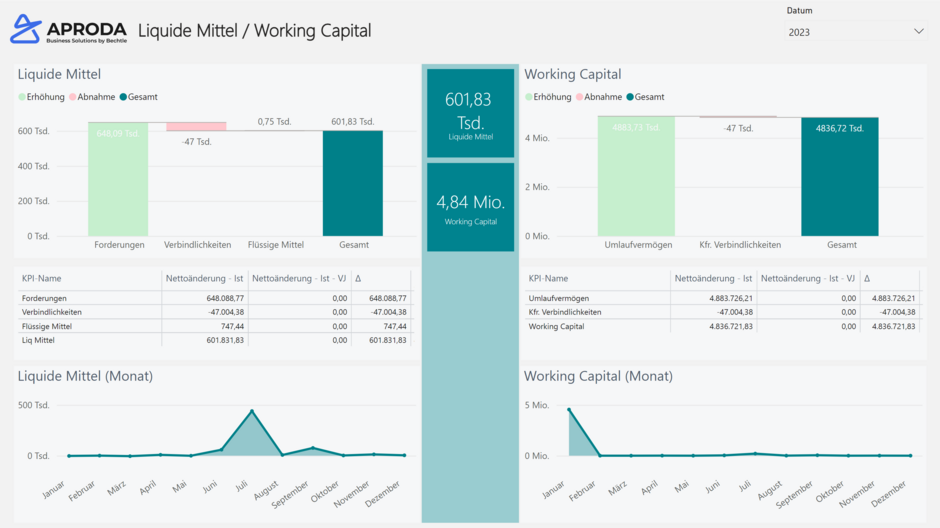
All analyses and reports can be easily exported to Excel for further processing. For advanced management reporting, integration with Microsoft Power BI allows you to create interactive dashboards, detailed visualizations, and in-depth analyses—providing powerful insights at a glance.

How can I tell if my accounting software is outdated?
When starting out, many small businesses or start-ups choose the services of a trustee or a simple accounting program that complies with Swiss regulations. The right solution is especially helpful in the early stages—supporting double-entry bookkeeping, managing company addresses, creating invoices and receipts, handling e-banking transfers, and generating basic balance sheets.
Growing Demands on Accounting Software
Over time, the requirements for accounting software evolve. Businesses increasingly expect more features and flexibility, while teams responsible for financial accounting, inventory management, payroll, or customer service seek comprehensive modules and accurate information tailored to their needs.
In practice, this often results in significant time loss due to numerous manual tasks—tedious and inefficient processes that slow growth. What should be a positive development becomes costly: manual work can hinder progress, and outsourcing to external trustees adds further expense.
The pressure on business software intensifies when companies expand internationally. Handling foreign currencies in e-banking and income statements introduces new complexity. Accounting systems must deliver efficient, reliable, and practical support for these challenges. Outdated programs, reliant on paper receipts, fall short. Modern solutions aim to eliminate paper and streamline processes. Integration demands also grow as businesses scale.
At this stage, traditional accounting software is rarely sufficient. Many companies hit the limits of their current systems and begin searching for a robust ERP solution with integrated accounting and advanced business analytics. Aproda is here to help—offering guidance, demonstrating the benefits of our solution, and showing how switching to an in-house system can save costs and drive efficiency.
When is the right time to switch to a professional ERP solution with financial accounting?
Ask yourself these key questions before upgrading your accounting system: Does your team still enter critical data manually? Are many tasks performed by hand that could be automated? Do you see significant time and cost losses in your balance sheet? Are errors frequent in your accounting processes? Is your accounts payable workflow cumbersome and manual?
If you answered YES to any of these, it’s time to take a closer look at your current accounting software and consider switching to an ERP solution with integrated financial management. For most SMEs, the potential savings from implementing an integrated ERP system are substantial. Eliminating data and software silos boosts efficiency, enables end-to-end processes, and delivers automation—giving you instant access to accurate data from purchasing through to accounting.
Uncover untapped potential
In our experience, many Swiss SMEs overlook the warning signs—and the opportunities—hidden in their daily operations. Often, decisions are delayed simply because the “old” accounting system still works somehow. But in the long run, this means leaving significant potential on the table. Conventional accounting software can handle basic tasks, but rarely meets the specific requirements of growing SMEs. This is where Microsoft Dynamics 365 Business Central truly makes the difference.
Increased administrative effort
As companies grow, manual administrative tasks tend to multiply. In retail, for example, disconnected systems can lead to lost sales and financial inefficiencies when product data isn’t linked to the online shop. In manufacturing, businesses often rely on hundreds of spreadsheets to manage everything—from bills of materials and cost centers to delivery addresses—creating complexity and risk. Non-profit organizations face similar challenges, losing funding opportunities due to the lack of proper tools for financial comparison and control.
We recommend that all SMEs regularly review their accounting software to ensure it still meets the company’s needs.
Modern Technologies Deliver Reliability
In today’s business environment, you need technology you can rely on—an ERP solution that helps you achieve your goals and supports everything from daily customer service to professional assistance. Modern deployment methods mean ERP systems can be implemented quickly and efficiently, with cloud-based procurement making the process even easier.
What sets Microsoft’s ERP software apart?
- Data at your fingertips: Real-time insights into your company’s performance
- End-to-end solution: Integrated financial accounting tailored to SMEs
- Automation and security: Streamlined processes with built-in compliance
- Scalability: Processes that grow with your business
- Seamless integration: Easy connection to portals, webshops, and partners via standard API interfaces
Payroll accounting as part of the solution
More and more Swiss companies are moving their payroll accounting to the cloud. These future-ready solutions help SMEs work securely, easily, and efficiently. At Aproda, we partner with Swiss Salary 365 to deliver exactly that.
Your benefits at a glance
- Save time: Withholding tax rates are updated automatically, and the software supports you from registration through error-free calculations.
- Stay compliant: Legal requirements and stakeholder updates are applied automatically.
- Instant reporting: Generate comprehensive reports at the touch of a button for full transparency.
- Effortless updates: Hotfixes and updates are installed automatically or on demand—no waiting required.
- No manual data entry: Thanks to seamless integration with ERP financial accounting.
- Enhanced security: Minute-by-minute backups ensure you can restore payroll data anytime.
Mobile access to payroll accounting
The free app for Microsoft Dynamics 365 Business Central is available for Android, Windows, and iOS devices. This gives you real-time access to your accounting—anytime, anywhere—within a familiar Dynamics 365 environment and a modern, mobile-optimized interface.
Practical Microsoft Office integration
The integration of Microsoft Office products with Microsoft Dynamics 365 Business Central enables seamless and efficient workflows in your accounting department. By connecting Office applications such as Excel, Word, and Teams to your ERP system, you can easily import, edit, and analyze financial data—improving data consistency and significantly reducing manual input errors.
This integration also simplifies the creation of meaningful accounting reports and enhances collaboration across departments by providing a unified platform for financial data.
Examples of practical integration
- Automated invoice dispatch: Send invoices directly via email.
- Outlook integration: Enter customer contact details straight from Outlook into your ERP system.
- Teams collaboration: Display and edit invoice documents in Teams—even simultaneously.
Overall, Microsoft Office integration helps optimize business processes, boost productivity, and support informed decision-making for your SME.
Aproda – certified Microsoft Dynamics 365 partner
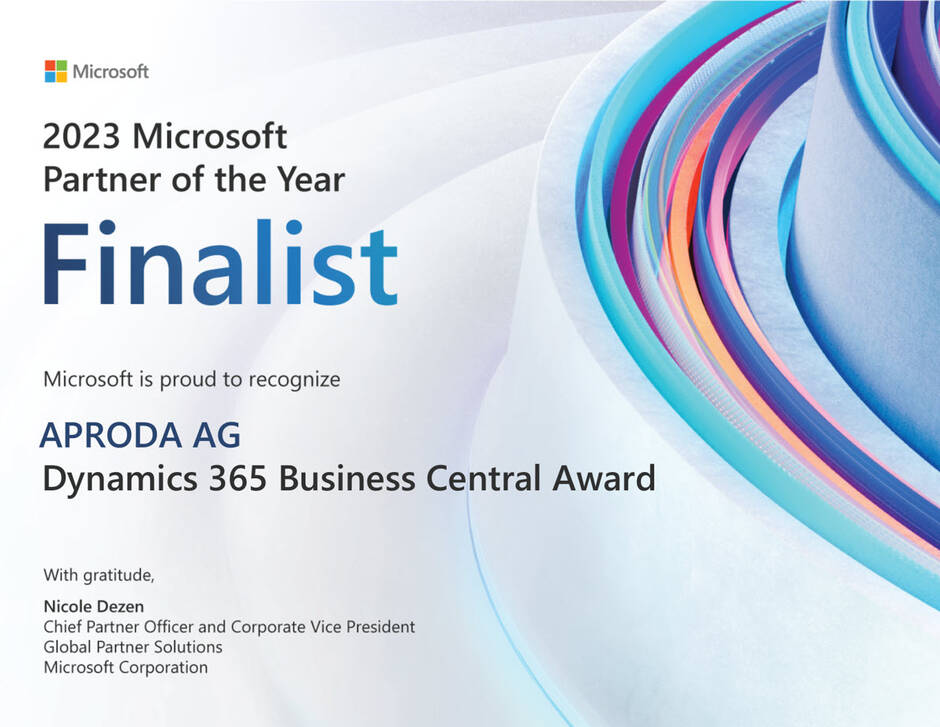
Aproda AG holds multiple certifications as a trusted quality partner. Most notably, we are recognized as one of the top four Microsoft Business Central partners worldwide, underscoring our expertise in ERP solutions.
Our Microsoft Advanced Specialisation award further validates this expertise. To earn this certification, specialized companies and Microsoft Gold Partners must demonstrate their skills through rigorous exams. Partners with this distinction guarantee customers proven knowledge and capabilities in designing and implementing digital solutions—along with comprehensive support.
Lumbardh Vokshi | Solution Sales Specialist
I will be very happy to advise you personally. Give me a call: 058 200 14 14 or send me a message. I look forward to hearing from you!
Contact us