

ERP-Systems: An Introduction to the Topic
What does ERP stand for?
What does ERP stand for?
ERP stands for Enterprise Resource Planning. An ERP System is a software solution that helps companies plan and control their business processes. In the Dynamics 365 Business Central ERP Software, all resources such as personnel, materials, and machinery are recorded and managed in a central database.
Modern ERP systems such as Dynamics 365 Business Central aim to increase efficiency and optimize internal processes. With the use and continuous development of ERP Systems, ordering processes can be automated and inventory levels can be better controlled.
Another advantage of ERP systems is the creation of a unified data foundation. This ensures that all departments across the company have access to the same information - whether it’s sales data, production data, or financial and accounting information.
ERP Implementation and its Risks
The successful implementation of ERP Solutions depends on several factors and involves a range of tasks for both your ERP consultants and your employees. Whether the rollout of a new ERP System (Enterprise Resource Planning) or a new CRM System (Customer Relationship Management) runs smoothly largely depends on how the project is executed. The implementation process typically consists of three phases: the specification phase, the core implementation phase, and the subsequent optimization phase of your ERP System. Below, you can see what each of these phases looks like within an implementation project, including their goals, key tasks, and most importantly the associated risks:
Before outlining the three phases, you should choose an ERP Partner. Aproda relies on one of the world’s leading software manufacturers Microsoft. A reliable partner forms the foundation for any successful implementation.
1. Specification of the ERP implementation
The first phase of your ERP project is the specification phase. Here, the requirements of your ERP solution are jointly analyzed and defined during the planning stage. This is where you determine how your business processes will be digitally mapped in the future. The goal of this phase is to establish the organizational and operational framework for the ERP implementation, including all relevant processes, operational data, and interfaces.
2. Main phase of the ERP implementation
In the next phase, your ERP Provider builds an initial executable system based on the defined specifications. This version already includes customer data, core processes, documents, customer-specific functions, and evaluations for the first end‑to‑end tests using predefined test cases. Training sessions take place early in the process. After this trial run, you and your ERP Provider can identify and define optimizations where they will add the most value.
3. Optimization phase of the ERP implementation
In the third and final phase, the ERP Software is completed and rolled out based on the defined optimizations. These improvements are prioritized and implemented step by step within the agreed budget using an agile project methodology until go‑live. Final training sessions and testing are carried out to ensure full go‑live readiness. During and after the go‑live phase, the customer receives close support from the ERP Provider to ensure quick responses and smooth operations.
What risks occur in the three phases of an ERP project?
Risk & Rule No. 1: Be careful when defining the scope of your ERP Solution
The first part of an ERP Project and your first task is to specify your company’s requirements. During this stage, there is a risk that optimization requests from key users, which are not strictly necessary at the beginning, may be introduced too early. This phenomenon during ERP Implementation is known as scope enhancement. Caution is needed here, as it can unnecessarily expand the solution and increase the overall cost of the ERP System.
Stay focused during this phase of the ERP Project and concentrate on the essentials. In other words: have the courage to leave gaps. And remember—only once you begin working with the software will you truly discover what your ERP Solution is capable of over time.
Risk & Rule No. 2: Do not underestimate change management
During both the main phase and the optimization phase, the ERP System becomes more defined. Employees receive training and gradually adapt to the new solution. This marks the transition from the old system to the new ERP platform. Effective change management is essential during this time: it guides the entire digital transformation from the current state to the desired future state and includes planning, coordination, support, monitoring, and stabilization. This applies not only to processes and responsibilities but also to company culture and the skills required across your workforce.
Take change management seriously, because day‑to‑day business, demanding project phases, and the transition to a new ERP solution place significant pressure and stress on your employees. Thoughtful vacation planning, the coordination of substitutes with your ERP Provider, celebrating project milestones, and strong internal project communication are all crucial for a healthy and successful ERP Project.
Relevante ERP System manufacturers
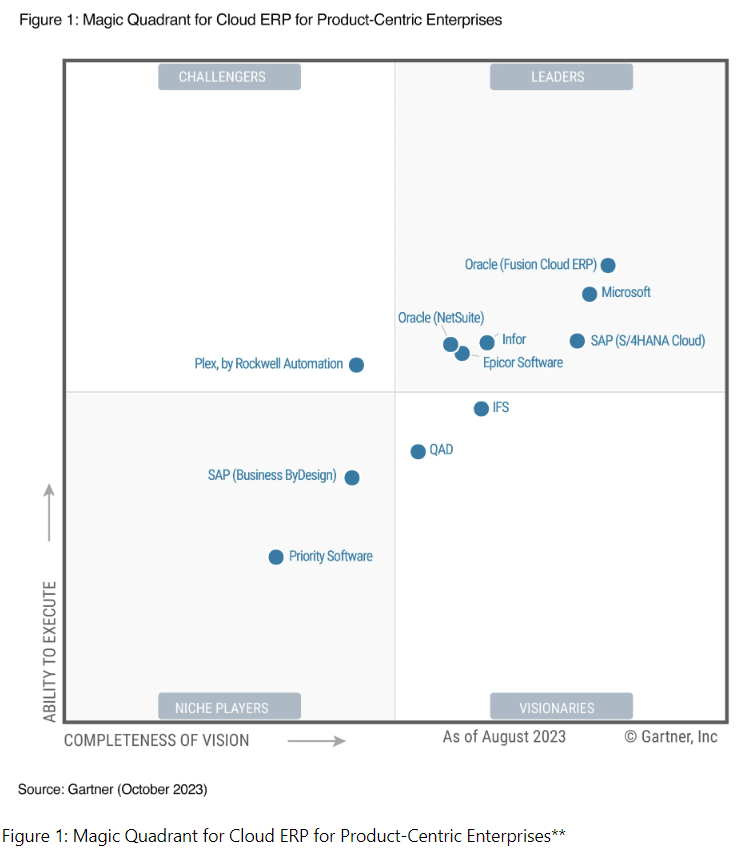
Nowadays, ERP Systems are widely used across companies of all sizes and industries. The market offers a wide range of ERP software solutions, including Microsoft as a provider of ERP Systems. Microsoft Dynamics, one of the company’s flagship products, brings decades of expertise in enterprise software. It helps small and medium-sized businesses automate their processes through fully integrated solutions that connect employees, customers, suppliers, and partners. These solutions support companies across many industries. The choice of an ERP Provider depends on a company’s specific requirements and goals and should therefore be evaluated carefully and objectively.
Which areas of a company does an ERP system cover?
ERP Systems (Enterprise Resource Planning systems) cover a wide range of areas, from procurement to production and should ideally support all of your company’s core business processes. This type of business software includes purchasing and sales processes, item management, warehouse and logistics operations, assembly and manufacturing workflows, and even finance and accounting functions, including reporting. Ideally, the requirements for an ERP system can be designed and implemented holistically so that processes beyond the core functions can also be integrated into the software solution.
What benefits do ERP Systems offer?
Overall, a well‑implemented ERP System (ERP stands for Enterprise Resource Planning) can make your business significantly more efficient - whether through improved process efficiency or greater transparency across all operational workflows. If you’re looking for ways to make your processes even more productive, implementing such a system is definitely worth considering. Discover here the wide range of benefits that Dynamics 365 Business Central can offer your organization:
Integration of different departments (consistency)
ERP systems integrate all of a company's business processes into a single solution. ERP Platforms such as Dynamics 365 Business Central can connect sales, purchasing and warehousing to automatically generate orders, reconcile inventory in real time and streamline management. From procurement to production, warehouse management, sales, and financial management, all operational data is recorded and processed centrally. This creates a holistic view of all company processes. Employees across your organization have access to real‑time data, enabling faster decision‑making and more efficient workflows in their respective areas. ERP systems such as Dynamics 365 Business Central therefore lead to increased productivity, improved sales performance, greater cost efficiency and a reduction in errors and redundancies.
Needs-oriented and adaptable
Another advantage of ERP Systems such as Dynamics 365 Business Central is their high degree of customizability. Depending on your requirements, the system can be built in a modular way and tailored precisely to the needs of your company. ERP Solutions like Dynamics 365 Business Central can be expanded with special modules for industry solutions and also offer interfaces to third‑party software systems.
Process optimization
With the introduction of an integrated ERP System, isolated system landscapes, manual process breaks, and data redundancies become a thing of the past. By centralizing business processes in one ERP solution, you can optimize workflows across multiple departments, as all employees work with the same database and have real‑time access to it. An integrated ERP System such as Dynamics 365 Business Central also ensures that individual departments from production and sales to human resources follow the standardized processes defined in the system, enabling a uniform and consistent way of working. This leads to improved productivity, greater transparency, and more efficient operations across the entire company.
Protection against data theft and loss
An ERP system also provides better protection against data theft or loss through regular backups and the secure storage of all data in accordance with applicable data protection regulations.
Which interfaces are available for ERP systems?
By connecting external systems such as a web shop or seamlessly integrating supplier and customer platforms, companies gain a strategic advantage. The choice of ERP System becomes especially important here, as most organizations today use their ERP Software as a central data hub. This allows other systems and business applications to be connected and integrated directly into the ERP environment.
Before implementing new business models and connecting different systems, it is important to consider the technical foundation: With Microsoft Dynamics 365 Business Central (formerly Dynamics NAV), companies rely on an ERP System built on modern technology. Standards such as open data and open API standards, as well as technologies like REST and SOAP web services, file exchange using XML, ASCII, CSV, or TXT formats, and SQL queries are fully supported. By integrating external systems in a more standardized, flexible, and faster manner, you save both time and money. You also keep all options open for future expansions and achieve the desired level of flexibility.
How can a company optimize its processes with ERP systems?
ERP Systems such as Microsoft Dynamics 365 Business Central (BC) software are indispensable for companies of all sizes and across all industries. They support the planning, control, and monitoring of business processes in every area of the organization - from production and human resources management to accounting. All relevant data is centrally recorded and processed, enabling a high level of transparency and rapid decision‑making.
Why you need an ERP system in your company
An ERP System (short for Enterprise Resource Planning) is a software solution designed to integrate and automate all of a company's business processes. If you run a small or medium-sized business, an ERP System can help you work more efficiently and become more competitive. There are many reasons why you might need an ERP System in your company. For one thing, it allows you to collect and manage all your data in one place, enabling quicker access to important information and faster decision-making. It also improves collaboration between departments because everyone works with the same consistent data. When all employees have access to the same information, communication becomes easier and faster. In addition, an ERP System helps reduce costs and streamline processes. By automating manual tasks, you minimise errors and increase employee efficiency. In short, an ERP System helps make your business more efficient and profitable.
Which companies benefit most from modern ERP software?
Modern ERP Software can bring considerable benefits to companies of all sizes, whether small, medium sized, or large. Increasing competitive pressure, especially in the SME sector, is motivating more and more businesses to adopt ERP Solutions in order to stay technologically up to date or even gain a competitive advantage. Powerful ERP Systems can effectively help medium sized companies and small businesses automate their business processes and respond flexibly to modern business requirements.
Modular, modern ERP Systems that can be tailored to the individual needs of SMEs are usually flexible enough to grow with the company and its evolving requirements. As a result, not only rapidly growing startups, but also well‑established companies benefit significantly from the use of an ERP system. Thanks to their adaptability and scalability, modern ERP Solutions can successfully support almost any type and size of business.
How ERP Systems drive productivity
ERP Solutions such as Microsoft Dynamics 365 Business Central can significantly increase your company's productivity. By integrating all business processes into a single platform, information can be exchanged more quickly and efficiently within your organization, and ERP Systems increase transparency across all operational processes. ERP Systems automate many manual activities, such as data entry and processing, saving time and reducing errors. Employees can focus on more important tasks instead of spending time on repetitive work.
In addition, ERP Systems like Dynamics 365 Business Central enable better collaboration between departments, as everyone has access to the same data. This leads to greater efficiency and smoother execution of projects and tasks. Overall, ERP Systems help your employees work more productively, which leads to better results for your company.
How ERP systems improve cost efficiency
An ERP System can improve cost efficiency in your company by enabling better control over resources and finances. By automating business processes and integrating data from different departments, you gain a clearer overview of your finance and accounting activities and can avoid unnecessary expenses. Another advantage is that an ERP System helps you identify and eliminate bottlenecks in production. For example, if certain materials are running low, you can react in time and reorder before delays occur. There is also potential for savings in the area of personnel: since many business processes can be automated, employees can be deployed more effectively and overtime can be avoided. Overall, an ERP System helps your company become more competitive and better positioned in the market.
How ERP systems help companies grow their revenue
An ERP System can not only increase productivity and improve cost efficiency, but also boost a company’s sales through its capabilities. By centrally managing all resources, business processes, and data in one system, sales staff can respond quickly to customer inquiries and prepare quotes more efficiently. This speeds up the sales process and increases profit margins. Better planning of production and inventory also leads to higher delivery readiness and greater customer satisfaction, both of which have a positive impact on sales. In addition, an ERP System can identify cross‑selling and up‑selling opportunities that generate additional revenue. Overall, an ERP System contributes significantly to increasing sales and is therefore a valuable component for any company.
Connectivity to external systems such as web shops or EDI connections to customer systems offers additional financial advantages.
What should be considered when implementing an ERP system?
Even though ERP systems offer many advantages, their implementation can be complex. Careful planning and an experienced team are therefore essential for the successful deployment of ERP software in your company. Below are some key aspects to consider when implementing an ERP system.
6 Steps for a Successful ERP Implementation
1. ERP Implementation – Defining Objectives
Define clear goals and expectations for introducing your ERP System. Determine which processes should be improved or automated and what outcomes you want to achieve.
2. ERP Implementation – Resource Planning
Ensure that you have sufficient human resources to implement the project successfully. Consider both internal employees and external consultants or implementation partners.
3. ERP Implementation – Process Analysis and Optimization
Take enough time to analyze and optimize your existing business processes before implementing the ERP System. This will help you identify and address inefficient processes.
4. ERP Implementation – Data Migration
Establish a plan for migrating your data from existing systems or Excel spreadsheets to the new ERP System. Make sure the data is transferred correctly and that you have the right tools in place to guarantee data integrity and consistency.
5. ERP Implementation – Training and Change Management
Schedule training sessions for your employees to ensure they can use the new ERP System effectively. A solid change management program helps minimize resistance and promote user acceptance of the new software.
6. ERP Implementation – Continuous Review and Optimization
Implementing an ERP System is not a one‑time process. Regularly review whether the system is delivering the desired results and make adjustments as needed to improve efficiency and performance.
It is advisable to seek expert guidance from ERP specialists or implementation partners to ensure that the rollout runs smoothly and meets your company’s requirements.

ERP Systems: On‑Premise vs. Cloud — What’s the Difference?
What is on-premise ERP?
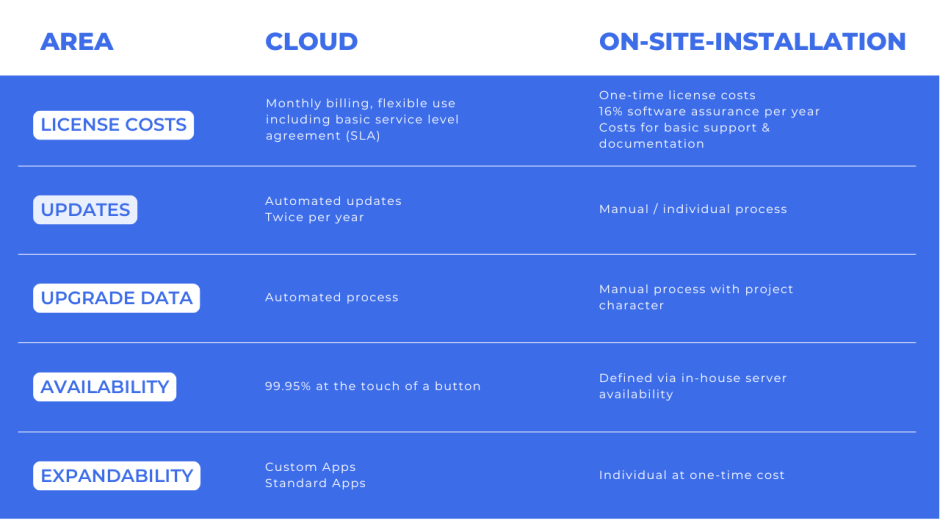
Essentially, on‑premise ERP Systems are software solutions that run on your company’s own servers. To use on‑premise ERP in your organization, you need to meet a few basic requirements:
- You need your own hardware, such as company servers or computers, where the ERP Software is installed locally.
- Implementing on‑premise software requires setting up a company‑owned data center or alternatively renting servers from external providers.
What is Cloud-ERP?
In contrast, cloud ERP does not require local installation on your company’s computers. All you need to get started is:
- a stable internet connection
- a working web browser
Cloud ERP is typically offered by specialized providers as a service, often using a subscription-based model. The provider supplies all hardware components required for a web‑based ERP system for a monthly fee and also handles maintenance, repairs, and updates.
What are the requirements for on-premise ERP?
You may want to consider on‑premise ERP if:
- You want to remain independent from external software providers.
- You already have your own hardware or a suitable IT infrastructure within your company.
- You prefer to manage your ERP system internally.
- Your company has IT specialists with the expertise to implement and maintain the system.
- You need the flexibility to customize the software to your specific requirements or add extra functionality.
- You want to take responsibility for your own data backups.
- You have sufficient budget to invest in an on‑premise ERP solution.
What is the difference between on-premise and cloud ERP?
Conclusion: Why Your Company Should Implement an ERP System
In conclusion, implementing an ERP System in your company is essential for working efficiently and remaining competitive. Here are the most important reasons for using an ERP system:
- With an ERP System, you always have an overview of all key information related to your business processes and can react quickly to changes.
- Productivity increases because redundancies are eliminated and processes are automated.
- Cost efficiency improves thanks to optimized resource planning and utilization.
- ERP systems can also boost sales, as they enable faster responses to customer inquiries and therefore better service.
- Connections to external systems such as web shops or EDI links to customer systems also support further growth.
Overall, implementing an ERP System is an important step toward ensuring your company’s long‑term viability.
Patrick Glauser | Head of Sales, Member of the Executive Board
Then I will be very happy to advise you personally. Give me a call: 058 200 14 14 or book a consultation with me directly. I look forward to hearing from you!
Contact us