

Microsoft Copilot for CRM: The AI Revolution for Your Sales
Microsoft Copilot for CRM
The world of sales is currently experiencing a revolution through artificial intelligence. Microsoft Copilot for CRM systems like Dynamics 365 Sales is fundamentally changing how sales teams work, serve customers, and close deals – all in an increasingly digital world where innovation makes the difference. This innovative AI integration promises not only efficiency gains but a completely new way of customer interaction – especially through the combination of Copilot with other AI assistants and solutions that together optimize diverse applications and business processes.
What used to take hours of manual work – from sifting through emails to creating personalized quotes – the AI assistant now does in seconds. Copilot is part of a new generation of AI technologies that are taking work processes to a new level. Copilot can be used in various applications and apps like Dynamics 365, Microsoft 365, and others to increase efficiency and productivity in sales and beyond. But how exactly does this technology work? What specific benefits does it bring to your company, and how do you successfully implement Copilot in your CRM system?
Copilot can automate and support almost everything in the sales process – from summarizing emails to creating presentations and analyses. But what specific advantages does this offer your sales team?
What is Copilot for CRM?
Microsoft Copilot for Sales is a groundbreaking integration of generative artificial intelligence into Customer Relationship Management (CRM) systems. This revolutionary solution is based on the most advanced language models (LLMs) from OpenAI, which are deeply integrated into the entire Copilot ecosystem.
The AI assistant is seamlessly integrated into Dynamics 365 Sales and can also be connected to other leading CRM platforms to transform your CRM system into an intelligent workplace. Copilot acts as an AI agent directly embedded in CRM systems to enhance sales insights and automate processes. Instead of complicated menu structures, users can communicate with their CRM system in natural language – as if they were talking to an experienced colleague.
Practical application examples:
- A salesperson asks: "Show me all open opportunities with Meier AG over CHF 50,000." – Copilot instantly delivers the relevant data.
- Automatic email drafts: "Create a follow-up email for the customer Müller GmbH regarding our last offer."
- Intelligent scheduling: The AI assistant suggests optimal meeting times based on customer behavior and internal calendars.
Copilot is based on advanced language models, so-called Large Language Models (LLMs), which significantly increase the efficiency and quality of work in the CRM. The advanced language models improve Copilot's ability to understand complex questions, maintain context in longer conversations, and even recognize tone and embedded meaning in communication.
The technology exclusively uses your existing company data from Dynamics 365, Microsoft 365, and connected systems. Interaction with Copilot often occurs through an intuitive chat interface, enabling natural and productive communication. This makes it much easier for users to access relevant information and interact with the system, as they receive answers tailored to user profiles and access rights. This avoids isolated AI islands and creates a consistently intelligent work environment.
In the CRM, fields can be automatically filled or updated by Copilot, which significantly simplifies data maintenance. Additionally, Copilot is able to automatically generate or summarize content on a page in the CRM to further increase user productivity.
Core Features of Copilot in Dynamics 365 Sales
The functional diversity of Copilot in Dynamics 365 Sales is impressive and covers virtually all aspects of modern sales by providing sales teams with valuable insights from CRM data. These AI features transform traditional sales processes into highly efficient, data-driven workflows.
Analysis and Forecasting of Sales Patterns
Copilot assists in analyzing sales patterns by evaluating relevant data and identifying trends. Furthermore, Copilot creates professional data visualizations in Excel, which allow for the quick and clear presentation of complex relationships, thereby increasing efficiency in data analysis.
Examples of CRM Queries
With Copilot, users can ask specific questions to the CRM, such as: "Which customers signed a contract in the last quarter?" or "What is the number of sales in the current month?" This allows sales teams to quickly get the information they need and make informed decisions.
Automatic Email Processing and Communication
- Intelligent Email Summaries: Copilot analyzes incoming messages and email threads, automatically extracts key information such as budgets, decision-makers, and project details, and highlights buying signals.
- Personalized Response Suggestions: Based on customer history and current opportunities, the AI generates tailored email responses. Copilot helps users process emails faster and more efficiently by providing relevant suggestions directly. For every user question in the email context, Copilot provides suitable response suggestions.
- Sentiment Analysis: The AI assistant recognizes the mood in customer communication and warns of critical situations, with Copilot also offering help in formulating difficult responses.
- Automatic CRM Updates: Relevant information from emails automatically flows into the corresponding customer records, drastically reducing manual data entry.
Intelligent Lead Qualification and Opportunity Management
The core of modern sales work lies in the efficient evaluation of sales opportunities. This is where Copilot fully plays to its strengths:
- Automatic Lead Scoring: New leads are evaluated and prioritized based on predefined criteria. Copilot estimates the potential of each lead based on existing CRM data to specifically identify the most promising opportunities.
- Opportunity Scoring: Each opportunity receives an AI-based score that predicts the probability of closing.
- Next-Best-Action Recommendations: For each sales opportunity, Copilot suggests the optimal next steps to increase the closing rate.
- Risk Identification: At-risk deals are identified early, and appropriate countermeasures are suggested.
Data-Driven Sales Forecasts
- Historical Data Analysis: Copilot analyzes sales patterns from recent years and identifies trends. In doing so, Copilot gains valuable insights from past data that help to specifically optimize the sales strategy.
- Pipeline Predictions: Precise forecasts for upcoming quarters based on current opportunities and historical data.
- Seasonal Adjustments: Consideration of industry-specific cycles and market developments.
- Individual Seller Performance: Personalized forecasts based on the history of individual sales employees.
Natural Language CRM Queries
One of the most revolutionary aspects is the ability to communicate with the CRM system in natural language:
- "Which customers have purchased more than CHF 10,000 in the last 30 days?"
- "Show me all overdue follow-ups for my team."
- "Create a list of all customers in the automotive sector with active projects."
- "Show me something about the customers who were recently active."
Copilot is able to answer questions that are relevant to the user. Even if the information is formulated somewhat imprecisely or vaguely, Copilot delivers suitable results. These prompts also allow non-technical users to perform complex data queries without needing SQL knowledge or complicated filters.
Application Areas of Copilot in CRM
Copilot opens up a multitude of new opportunities for companies to use their CRM system even more effectively. The AI-powered Copilot features can be flexibly used in different business areas, leading to a noticeable increase in efficiency, productivity, and customer focus. Whether in sales, customer service, or marketing – Copilot helps teams complete tasks faster, gain relevant information from the CRM system, and elevate customer interaction to a new level.
Sales Automation and Pipeline Management
In modern sales, speed and precision are crucial. Copilot takes over numerous tasks in the CRM system that previously consumed a lot of time and resources. The AI assistant automatically identifies new sales opportunities, generates qualified leads, and supports the sales team in prioritizing the most important opportunities. By automating pipeline management tasks, Copilot ensures that no potential customers are overlooked and all leads are systematically followed up.
A particular added value comes from Copilot's ability to create personalized emails and messages. Based on the customer data stored in the CRM system and previous interactions, the AI generates individual cover letters that are specifically tailored to the needs and interests of the customers. This not only increases the productivity of the sales teams but also enhances the success rate when approaching new and existing customers. With Copilot, routine sales tasks are automated, allowing employees to focus on building relationships and closing deals. Copilot relieves employees of repetitive tasks, giving them more time for direct customer contact.
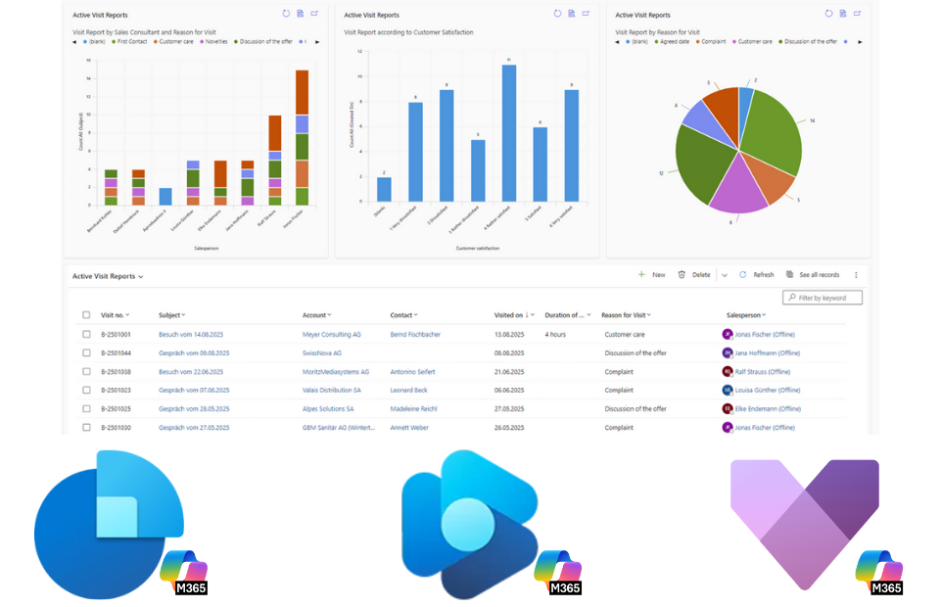
Customer Service and Support Optimization
Copilot also revolutionizes daily workflows in customer service. Copilot provides targeted help in quickly processing support requests by offering automated assistance and context-related support. Through integration with the CRM system, the AI assistant can automatically capture incoming requests, pull relevant information from customer data, and immediately generate suitable answers. The AI functions of Copilot make it possible to process support tickets efficiently and resolve customer issues faster.
Copilot ensures that support staff always have access to all relevant information, enabling them to provide personalized, competent answers. The automation of standard inquiries relieves the team and creates space for handling more complex cases. The result: an optimized support process that sustainably increases customer satisfaction and utilizes the CRM system as a central source of information.
Marketing and Campaign Management
In marketing, Copilot particularly plays to its strengths in the automation and personalization of campaigns. The AI assistant analyzes the customer data stored in the CRM system, identifies relevant segments, and supports the marketing team in creating targeted content. Copilot specifically adjusts the tonality of marketing messages to the respective target group to achieve the desired effect and appeal. This allows for the development of personalized offers and messages that are precisely tailored to the needs of the respective target group.
The AI functions of Copilot make it possible to plan, execute, and evaluate marketing campaigns more efficiently. Tasks such as selecting the right channels, optimizing sending times, or analyzing campaign results are automated and facilitated by Copilot. This increases efficiency in marketing and ensures that every campaign achieves maximum impact – with minimal manual effort and optimal use of CRM data.
Copilot Integration in Microsoft 365 for Sales Teams
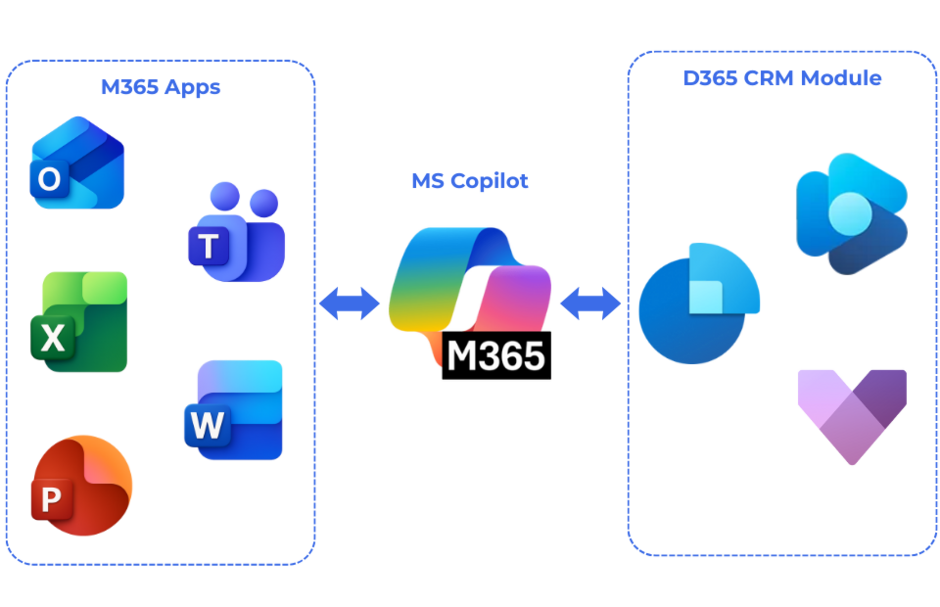
The true strength of Copilot unfolds through its seamless integration into the entire Microsoft 365 environment, including Office 365 and other productivity tools, which become significantly more efficient through AI-based support. Copilot combines various business applications like Microsoft 365 and Dynamics 365 to create a consistent user experience and optimize collaboration between applications. This network creates a unified ecosystem in which all tools communicate intelligently with each other.
Within the Office integration, Copilot acts as a tool for automation and support, optimizing work processes in Word, Excel, PowerPoint, Outlook, Teams, and OneNote and taking over repetitive tasks.
Furthermore, Dynamics 365 Copilot is integrated into various Dynamics modules, such as Dynamics 365 Customer Insights, Dynamics 365 Field Service, and ERP systems like Microsoft Dynamics 365 Business Central. The combination of Copilot with Dynamics 365 and Microsoft 365 increases efficiency by enabling the integration of business applications and AI-powered features. In Dynamics 365 Customer Insights, Copilot assists in analyzing and segmenting customer data to enable targeted marketing and personalized customer experiences. In ERP systems like Business Central, Copilot boosts productivity by automating tasks, analyzing data, and optimizing processes – especially in handling customer data and improving the customer experience.
Outlook Integration for CRM-Supported Email Communication
Microsoft 365 Copilot revolutionizes email communication for sales teams:
- Context-Aware Email Creation: When composing emails to CRM contacts, Copilot automatically suggests relevant information from the customer's history and automatically provides relevant information from various sources for email communication.
- Intelligent Subject Lines: Optimized subject lines are generated based on content and recipient.
- Automatic CRM Linking: Emails are automatically associated with the corresponding opportunities and contacts.
- Follow-up Reminders: Copilot detects when important emails go unanswered and creates corresponding tasks.
Teams Meeting Integration for Effective Customer Communication
Teams meetings become valuable data sources for your CRM system with Copilot:
- Live CRM Data During Meetings: During customer calls, sales staff can access current customer data via voice command.
- Automatic Meeting Transcripts and Analyses: Conversations are transcribed and automatically searched for action items, decisions, keywords, competitor mentions, and highlights, with Copilot recognizing and marking important meeting content.
- AI-Generated Meeting Summaries: After each conversation, Copilot creates a structured summary with follow-ups that can be saved directly in the CRM.
- Real-time Coaching: During the conversation, sellers receive discreet hints and answers to customer questions based on the CRM data history.
Office Integration for End-to-End Productivity
Word Integration for Professional Quote Creation:
- Automatic generation of quote documents and meeting preparations based on CRM data
- Personalized content for different customer types
- Consistent formatting and adherence to corporate design
Excel Analyses through Natural Language:
- "Create a chart of sales development by region"
- "Show me the top 10 products by revenue"
- Automatic pivot tables and dashboards
PowerPoint Presentations with Current Data:
- Dynamic slides with live CRM data
- Automatic updates when data changes
- Industry-specific templates and content
Email Management with Copilot
Email management becomes a strategic sales tool with Copilot:
Automatic Personalization:
- Individualized address based on customer behavior
- Industry-specific communication styles
- Optimal sending times for customers
Intelligent Appointment Suggestions:
- Consideration of customer preferences
- Automatic time zone adjustment
- Integration with external calendar systems
Sentiment Analysis for Better Customer Care:
- Early detection of dissatisfied customers
- Escalation workflows for critical messages
- Positive sentiment trends as sales opportunities
Teams Integration for Sales Meetings
Teams becomes the central hub for customer-oriented collaboration:
Live CRM Data During Customer Calls:
- Instant access to purchase history
- Current project status and budgets
- Competitor analyses and market position
Automatic Meeting Follow-up:
- Structured minutes with CRM linking
- Automatic task creation for follow-up activities
- Integration into existing sales processes
AI-Generated Follow-up Tasks:
- Prioritized to-do lists based on conversation content
- Automatic deadline suggestions
- Cross-team task distribution
Benefits for Sales Teams and CRM Users
The implementation of Copilot in CRM systems brings measurable benefits for companies of all sizes, with the goal of significantly increasing user efficiency. These efficiency gains go far beyond simple automation and create real added value for sales teams.
Quantifiable Productivity Increases
Up to 90 minutes of time saved per week: Microsoft studies show impressive productivity gains. Salespeople spend significantly less time on data entry, report creation, and follow-up activities. This gained time flows directly into value-adding customer activities.
Up to 25% faster deal closures:
- With real-time insights and the automation of manual CRM updates, sales teams can focus on building relationships.
- Email templates and responses save valuable time daily.
- CRM data maintenance is largely automated through AI-powered data extraction.

Qualitative Improvements in Customer Care
Improved data quality through automatic CRM maintenance:
- Completeness of customer data increases significantly
- Up-to-date information through automatic updates from emails and meetings
- Reduction of data duplicates
Higher conversion rates through personalized customer approach:
- Increase in email open rates through AI-optimized subject lines
- Higher response rates for personalized messages
- Improvement of the deal closing rate through optimized timing recommendations
Strategic Competitive Advantages
Faster deal closures through intelligent sales support:
- Sales cycles can be shortened
- Earlier identification of buying signals
- Proactive handling of objections through historical data analysis
Reduced onboarding time for new sales employees:
- New team members reach their target productivity faster
- AI-powered coaching functions support skill development
- Standardized processes through intelligent workflows
ROI Calculation for Companies
Area | traditional | with Copilot | Improvement |
CRM Data Maintenance |
2h/day |
30min/day |
75% time savings |
Email Processing |
3h/day |
1h/day |
66% efficiency increase |
Lead Qualification |
45min/lead |
10min/lead |
78% acceleration |
Quote Creation |
4h |
1h |
75% faster |
For a sales team of 10 people, this corresponds to a productivity increase of about 2.5 full-time equivalents – without additional personnel costs.
Implementation and Licensing of Copilot for CRM
The successful introduction of Copilot for Sales requires thoughtful planning regarding licensing, technical prerequisites, and change management, with the correct setup of Copilot being particularly crucial for the success of the implementation.
License Requirements and Technical Foundations
Microsoft 365 Base License: To use Copilot, all users need a qualifying Microsoft 365 license (e.g., E3, E5, Business Standard, or Business Premium).
CRM System: A functioning CRM application is a prerequisite. Copilot for Sales is primarily optimized for Dynamics 365 Sales and also offers compatibility with other common CRM systems.
Configuration and Authorization Concept
Tenant-level Configuration: The activation of Copilot is done centrally via the Microsoft 365 Admin Center. Administrators can granularly control which Copilot features are available for which user groups.
Role-Based Access Control:
- Sales Manager: Full access to all Copilot features including team analytics
- Sales Representative: Standard functions for own opportunities and customers
- Marketing: Access to campaign-relevant AI tools
- Service: Specialized support functions
Data Permissions: Copilot respects all existing CRM access rights. Users can only access data for which they are already authorized – the AI does not extend permissions.
Change Management and User Adoption Strategies
Phased Rollout:
- 1. Pilot Phase (4-6 weeks): 5-10 power users test basic functions
- 2. Extended Pilot Phase (8-12 weeks): Expansion to the department level
- 3. Full Rollout (3-6 months): Staged activation for all users
Training Concept:
- Basic Training (2 hours): Introduction to AI concepts and Copilot functions
- Hands-on Workshops (4 hours): Practical exercises with real scenarios
- Advanced Training (2 hours): Advanced features and optimization
- Continuous Training: Monthly "Copilot office hours" for questions and new features
Success Measurement:
- Usage statistics of Copilot features
- Productivity metrics before and after implementation
- User satisfaction through regular surveys
- ROI tracking based on time savings and revenue increases
- In change management, all relevant aspects of user acceptance should be considered to ensure a successful implementation
Data Protection and Security with CRM Copilot
For Swiss companies, data protection and compliance are key decision-making criteria. Microsoft has implemented comprehensive, enterprise-grade security measures that meet the current state of technology and compliance requirements to address these needs.
User-Based Access Control
Identity-Based Permissions: Copilot for CRM works exclusively based on the existing user identity. The AI can only access data for which the respective user already has read permissions. This means:
- No extension of existing access rights by AI
- Full integration into Microsoft Entra ID (formerly Active Directory) structures
- Automatic consideration of departmental and regional boundaries
Granular Administrator Controls: IT administrators can precisely control which Copilot features are available for different user groups:
- Deactivation of specific AI features according to compliance requirements
- Restriction of data sources for AI analyses
- Audit trails for all AI-generated content and decisions
GDPR-Compliant Data Processing
European Data Centers: All company data is processed within the Microsoft 365 service boundary, which ensures compliance with the EU data framework and GDPR. Microsoft acts as a data processor in this context.
No Storage Outside the Microsoft Cloud: A critical security aspect: Copilot does not store company data outside the existing Microsoft 365 and Dynamics 365 environment. The AI models are not trained with specific company information.
Data Minimization and Purpose Limitation:
- AI analyses are only performed for explicitly defined business purposes
- Automatic deletion of temporary processing data
- No disclosure to third parties or for other purposes
Transparency and Traceability
Audit Functions:
- Complete logging of all AI interactions via tools like Microsoft Purview
- Tracking of data sources for AI-generated content
- Compliance reports for internal and external audits
Explainable AI: For most recommendations and results, Copilot can disclose the underlying data sources and decision logic. This enables:
- Validation of AI decisions by subject matter experts
- Compliance with algorithm transparency requirements
- Continuous improvement of AI quality
The Future of AI in CRM: Outlook and Developments
The development of AI in the CRM field is continuously accelerating – an exciting journey marked by constant progress and new trends. With the integration of the most advanced AI models, Microsoft has raised the bar and is planning further innovations.
Planned Enhancements and Roadmap
Planned Development: Autonomous Agents for Sales Processes: The next evolutionary stage is autonomous AI agents that can independently carry out sales activities. These will be created and customized via Copilot Studio to handle specific business logics that require more complex models. Sales Copilot plays a central role here by providing AI-powered automation for tasks such as email responses, meeting summaries, and CRM integration, further increasing sales productivity.
- Independent lead qualification and follow-up
- Automatic appointment coordination between customer and salesperson
- Proactive customer care based on behavioral patterns
- Independent quote creation for standard products
Predictive Analytics and Proactive Customer Care
Advanced Prediction Models: Future Copilot versions will enable even more precise predictions:
- Customer churn risk 6-12 months in advance
- Optimal product recommendations based on market trends
- Real-time price optimization based on competitor analysis
Proactive Customer Interaction:
- Automatic detection of upselling opportunities
- Preventive problem-solving before customer dissatisfaction arises
- Dynamic adjustment of communication strategy per customer
Azure OpenAI Service Integration
Custom Copilots for Specific Industries: In the future, companies will be able to develop industry-specific Copilot variants via Azure AI Foundry and Copilot Studio:
- Pharmaceutical industry: Integration of regulatory requirements
- Financial services: Compliance-aware customer consulting
- Mechanical engineering: Technical specifications in sales processes
Enhanced Personalization:
- Individual AI models per company
- Consideration of company-specific terminology and processes
- Integration of proprietary data sources and algorithms
Multi-Channel and Multi-Modal Capabilities
Expanded Communication Channels:
- WhatsApp Business and LinkedIn integration
- Video analysis for customer conversations
- Voice-to-text for conference calls with automatic CRM updates
Multimodal AI Interaction:
- Image and document analysis for automatic quote creation
- AR/VR integration for immersive product presentations
- IoT data integration for proactive service approaches
Best Practices for Successful Copilot Use in CRM
Implementing Copilot for CRM is only the first step. Long-term success depends on proven practices based on the experiences of early adopters.
Training in Natural Language Interaction
Prompt Engineering for Sales Teams: Effective Copilot use requires learning optimal communication patterns with the AI:
Successful Prompts for Sales:
- Specific: "Show me all automotive customers with a project volume over CHF 100,000 and last contact more than 30 days ago"
- Contextual: "Create an email for customer XY regarding the offer from March 15th with a focus on ROI aspects"
- Goal-oriented: "Which three sales opportunities have the highest probability of closing this week?"
Avoidable Prompt Errors:
- Too vague requests: "Show me customers" → "Show me active B2B customers with open projects"
- Missing context: "Write an email" → "Write a follow-up email for the demo appointment with customer Y"
- Unrealistic expectations: "Tell me which customer will buy tomorrow" → "Analyze purchase probability based on engagement data"
Building a High-Quality CRM Data Foundation
Data Quality as the Foundation for Success: Copilot is only as good as the underlying data. Before implementation, companies should optimize their CRM data quality:
Critical Data Fields for AI Success:
- Complete contact information (aim for 95%+ completeness)
- Structured notes instead of free-text chaos
- Consistent lead statuses and opportunity stages
- Linking with external data sources (LinkedIn, company databases)
Data Cleansing Before Copilot Activation:
- Duplicate elimination reduces AI confusion
- Standardization of input formats
- History cleanup for relevant training patterns
Phased Rollout with Measurable Success
Pilot Group Approach: The most successful implementations begin with a carefully selected pilot group:
Ideal Pilot Group Characteristics:
- 5-10 tech-savvy sales employees
- A representative mix of experienced and new team members
- High CRM usage even before Copilot introduction
- Willingness to provide regular feedback
Measurable Success Metrics:
- Time-to-response for customer inquiries
- CRM data update frequency
- Email open and response rates
- Deal conversion rates and sales cycle length
Continuous Optimization and Feedback Loops
Regular Performance Reviews:
- Monthly analysis of Copilot usage statistics
- Quarterly Business Reviews with ROI assessment
- Semi-annual strategy adjustments based on new features
Community of Practice:
- Internal Copilot champions as multipliers
- Regular best-practice exchange sessions
- Collection and sharing of successful prompt examples
Integration into Existing Sales Processes
Workflow Integration Without Disruption: Copilot should complement existing, proven processes, not replace them:
CRM Workflow Optimization:
- Integration of Copilot recommendations into standard sales stages
- Automated reminders for AI-suggested follow-ups
- Quality control of AI-generated content by experienced salespeople
Change Management for Sustainable Adoption:
- Clear communication of the added value for all employees
- Gradual reduction of manual tasks in favor of AI support
- Celebration and recognition of early successes
Conclusion: The Transformation of Sales through AI
The numbers speak for themselves: time savings of over 90 minutes per week and up to 25% faster deal closures are not theoretical potentials, but documented successes at companies that have already successfully implemented this technology.
Nevertheless, Copilot for CRM is not a sure-fire success. Success depends heavily on a well-thought-out implementation strategy that equally considers data quality, change management, and continuous optimization. Companies that invest in this technology today and train their sales teams accordingly are positioning themselves optimally for the future of data-driven sales.
The development is just beginning: autonomous AI agents, predictive analytics, and industry-specific solutions will expand the possibilities even further in the coming years. Those who lay the foundation now will benefit maximally from future innovations.
Are you ready to revolutionize your sales? The technology is available, the success stories are documented, and the roadmap is promising. The next step is yours: start with a pilot implementation and experience for yourself how Copilot for CRM transforms your sales processes.
You might also be interested in
Riccardo Marciello | Solution Sales Specialist
Then I would be happy to advise you personally. Give me a call: 058 200 14 14 or book a consultation with me directly. I am looking forward to hearing from you. >>Book an initial consultation here.
Contact usFAQ
What is Microsoft Copilot for CRM?
Copilot is an AI-powered extension for CRM systems like Dynamics 365 Sales. It revolutionizes sales work by automating tasks, analyzing data, and elevating communication with customers to a new level – all through an intuitive chat interface.
How does Microsoft Copilot specifically support daily sales activities?
From summarizing emails and creating personalized quotes to intelligent appointment scheduling – Copilot takes over routine tasks and delivers relevant information in seconds. This leaves more time for direct customer contact and simplifies your work.
What benefits does Copilot offer my sales team?
Copilot increases efficiency, improves data quality, and assists with lead qualification and opportunity management. With AI-based recommendations, scoring, and forecasts, the sales process becomes data-driven and significantly more successful.
How does communication with Copilot work in the CRM?
It's simple: users ask questions in natural language, like "Which customers signed a contract in the last quarter?" – and Copilot instantly provides the right answers, without complicated filters or SQL knowledge.
In which areas outside of sales can Copilot be used?
Copilot also optimizes customer service and marketing. In support, it helps with the quick processing of inquiries; in marketing, it assists with the segmentation and personalization of campaigns – all based on CRM data.
How does Copilot integrate with existing Microsoft tools?
Copilot is seamlessly integrated into Microsoft 365 – from Outlook and Teams to PowerPoint. This creates end-to-end workflows where CRM data is used live in meetings, emails are automatically linked, and presentations are created with AI support.