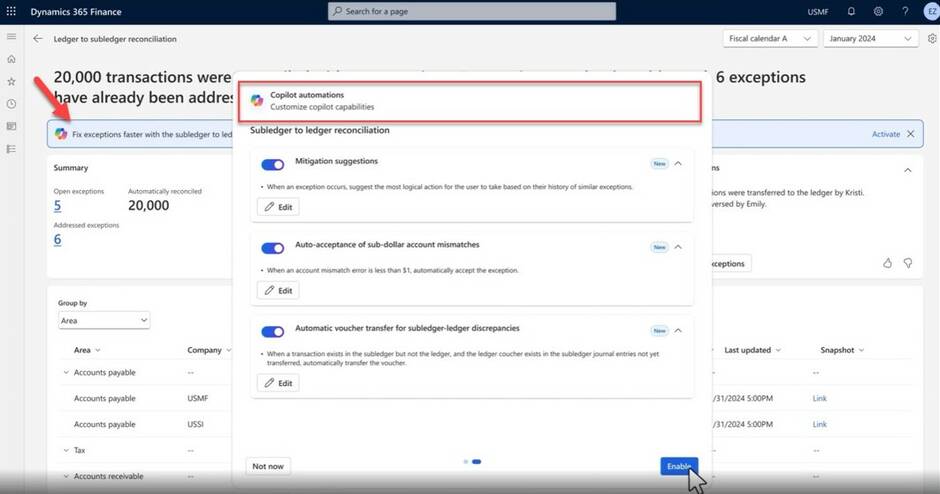

Microsoft Copilot for ERP: AI-Powered Business Processes with Microsoft Dynamics 365
Microsoft Copilot for ERP
Digital transformation is reaching a new dimension: Artificial intelligence is revolutionizing traditional ERP systems, turning them into intelligent, proactive business platforms. Microsoft Copilot for ERP marks a turning point—from reactive databases to AI-powered assistants that actively support and optimize business processes.
The integration of Copilot into Microsoft Dynamics 365 Business Central is more than just a technical upgrade. It's the beginning of a new era where companies can fundamentally change their daily workflows through intelligent automation and natural language interaction. Copilot for ERP is an integrated business software that combines everything for company management into a single platform.
What is Copilot for ERP?
Copilot for ERP is an AI assistant integrated directly into Microsoft Dynamics 365 Business Central (BC), transforming traditional ERP systems into intelligent business partners. This revolutionary technology uses artificial intelligence to automate and optimize business processes, with Large Language Models (LLMs) and cloud computing forming the technological foundation.
The key difference from conventional ERP solutions lies in its proactive support: Instead of just managing data, Copilot continuously analyzes business processes, recognizes patterns, and makes intelligent suggestions. Companies can interact with complex ERP data and functions through natural language, without needing technical expertise. The success of Copilot for ERP depends primarily on user acceptance and natural interaction.
This AI-powered solution significantly reduces manual entries and accelerates decision-making processes in daily business operations. Initial analyses and practical experience indicate substantial productivity gains, especially in warehouse and accounts receivable management tasks, after generative AI features were integrated into the ERP system. Copilot for ERP optimizes the entire organization by effectively connecting teams, processes, and data.
The core technologies include:
- Natural Language Processing for intuitive user interaction
- Real-time access to structured and unstructured business data
- Context-sensitive analysis for tailored answers and recommendations
- Seamless integration with Microsoft Graph and other business apps
Benefits of Copilot for ERP Systems
Using Copilot in Dynamics 365 Business Central opens up a new dimension of efficiency improvement and process optimization for companies. Through the intelligent integration of AI technologies, routine tasks in the ERP system are automated, allowing your teams to focus on strategic and value-adding activities. Copilot continuously analyzes company data, recognizes patterns, and proactively provides recommendations that support informed decisions at all levels.
The seamless integration of Copilot into Dynamics 365 makes it possible to simplify complex business processes and increase productivity throughout the entire company. Thanks to AI-powered analysis, trends and deviations are detected early, enabling a quick response to changes in the market environment. Companies benefit from a variety of features that not only increase the efficiency of daily work but also improve the quality of decisions.
With Copilot, Dynamics 365 Business Central becomes the central platform for data-driven business processes. The automation of routine tasks, intelligent support for analysis, and optimization of workflows make Copilot an indispensable tool for modern companies looking to secure their competitiveness in the digital age.
Copilot Features in Microsoft Dynamics 365 Business Central
Since 2024, Microsoft has integrated a variety of AI features into Business Central that fundamentally simplify daily work with the ERP system. These features are already included in the standard licenses and do not require additional investment in separate AI tools.
The available Copilot features cover various areas of the company—from warehouse management, logistics, and supply chain to sales and finance, including financial analysis. Each feature is designed to automate routine tasks and give employees more time for strategic activities.
Chat Assistant for ERP Data
The Copilot chat revolutionizes how teams interact with their ERP system. Instead of navigating through complex menu structures, users can ask simple questions in natural language and receive immediate answers from the entire company database.
Practical Application Examples: The following examples show typical use cases for how the Copilot chat can be used in Microsoft 365 applications:
- "Show me the latest quotes for customer ABC" – Copilot delivers all relevant data and context in the chat window
- "Do we have an office chair in stock for under CHF 600?" – Example of using Copilot for a quick query of inventory data in Microsoft 365 applications
- "How did our sales figures develop in the last quarter?" – Automatic analysis with visualization
The chat assistant also allows for follow-up questions for more detailed analyses and explanations. A large portion of inquiries can be answered directly and correctly without users needing to conduct external research. The automatic chat help also explains system fields and complex ERP functions, with direct access to Microsoft Learn content providing immediate assistance.
Automatic Sales Line Creation
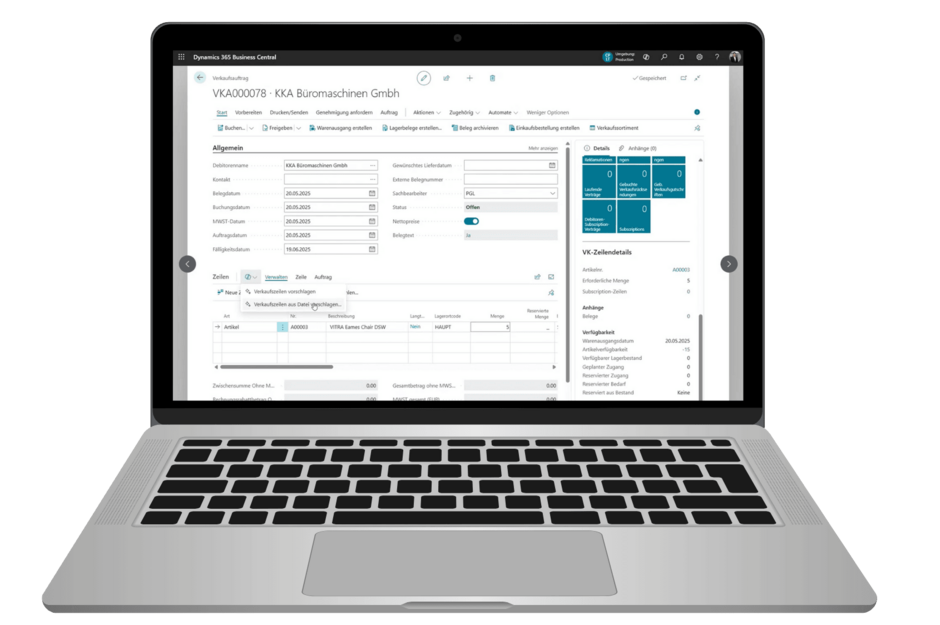
One of the most time-consuming tasks in sales—creating sales documents—is significantly accelerated by Copilot. The system automatically generates sales documents based on natural language prompts and can even process Excel imports for quick document creation.
Core Features:
- Intelligent product recognition: Copilot identifies items based on descriptions and suggests suitable products
- Customizable tonality: Sales documents can be personalized depending on the customer type and situation
- Batch processing: Multiple quotes can be created simultaneously and adapted for different customers
The time spent on routine document creation tasks can thus be significantly reduced. Additionally, Copilot automatically suggests the next activities in the sales process and documents them directly in the system. This allows sales teams to focus on customer relationships and strategic sales activities instead of administrative work.
Intelligent Analysis Tabs
Copilot democratizes data analysis within the company. Using simple sentence descriptions, the AI creates data-based analyses that previously required Excel expertise or BI knowledge. Directly in Business Central, users can activate analysis mode on list pages. This allows them to pivot and visualize data to gain quick insights into the database—all without leaving the application.
Application Areas:
- Supply chain optimization: Automatic identification of bottlenecks and delays
- Customer behavior analysis: Recognition of purchasing patterns and trends
- Inventory optimization: Intelligent forecasts for optimal stock levels
Automated data visualization supports decision-making at all company levels. Executives receive easy-to-understand reports, while operational teams can use detailed analyses for their daily work.
Sales Order Agent – The ERP Autopilot of the Future
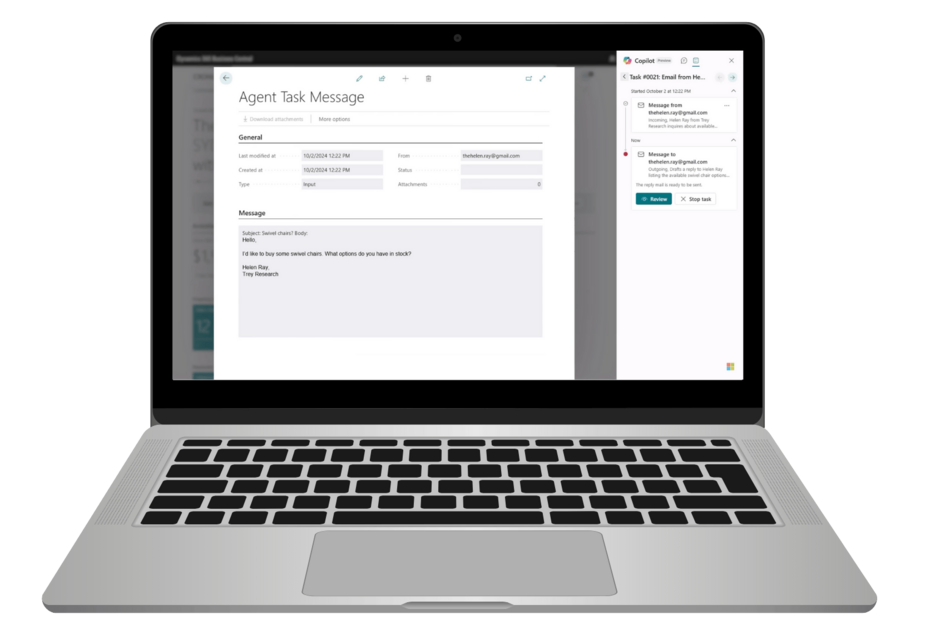
For the near future, with an initial preview version starting in 2025, Microsoft has announced a revolutionary extension: the Sales Order Agent. This intelligent agent functions like an autopilot for the entire order fulfillment process and marks the next step towards the complete automation of business processes.
The Sales Order Agent continuously monitors sales processes, detects anomalies, and automatically optimizes workflows. Errors are minimized, and the entire order fulfillment process is accelerated without needing to change existing workflows. Your teams can focus on nurturing and expanding customer relationships, while order management and processing are handled reliably and quickly in the background.
Planned Core Capabilities of the Sales Order Agent:
- Proactive process optimization: Detection of inefficiencies and automatic improvement suggestions
- Error prevention: Intelligent validation of order data before processing
- Workflow automation: Autonomous processing of standard orders
- Exception management: Escalation of complex cases to human experts
- Suggestion of next steps: Automatic display and recommendation of the next steps in the sales process
This development shows Microsoft's clear vision: ERP systems are evolving from reactive tools into proactive business partners that independently contribute to company efficiency.
Copilot in Other Microsoft Dynamics 365 Modules
AI integration is not limited to Business Central. Microsoft is pursuing a comprehensive strategy of connecting ERP, CRM, and productivity tools. This holistic approach allows companies to leverage the benefits of artificial intelligence in all business areas.
The integration of Copilot with Office 365 and other Microsoft products, as well as AI-based tools, further enhances collaboration and productivity.
Dynamics 365 Customer Service uses Copilot for automated ticket processing and intelligent solution suggestions. In Supply Chain Management, AI assists in predicting supply bottlenecks and optimizing inventory management. This cross-module integration creates a coherent digital ecosystem for modern companies.
Copilot for Sales in Dynamics 365 CRM
Sales teams benefit from special AI assistants that are seamlessly integrated into Microsoft 365. Copilot for Sales combines CRM data with email communication and meeting management for a fully integrated sales experience.
Key Features:
- Personalized email generation: Automatic creation of customer-specific emails based on CRM data
- Intelligent scheduling: Suggestions for optimal meeting times based on customer behavior
- Real-time CRM integration: Live access to customer data during Teams meetings
- Automatic transcripts: Meeting summaries with CRM-relevant information
Copilot assists users on every page of the application, guiding them through the entire sales process with helpful features.
A Microsoft 365 E3/E5 or Business Standard/Premium license is required for use. The integration occurs directly within familiar Office applications, which significantly increases user acceptance.
Add-Ons and Extensions for Copilot in Dynamics 365
The flexibility of Dynamics 365 and Copilot is particularly evident in the multitude of available add-ons and extensions. Companies can specifically tailor their ERP system to individual requirements and integrate additional functions that go beyond the standard. Microsoft partners develop innovative solutions that enable, for example, the integration of further AI technologies, the automation of specific processes, or the creation of customized reports.
By using add-ons, Copilot becomes a powerful tool for optimizing business processes. Companies benefit from improved integration between different systems, higher efficiency in workflows, and the ability to flexibly incorporate new functions into their existing ERP landscape. This ensures that Dynamics 365 remains adaptable and grows with the company's requirements.
Technical Requirements and Licensing
The implementation of Copilot for ERP requires a well-thought-out technical foundation and the right licensing model. Microsoft has intelligently integrated AI features into existing license structures to make it easier for companies to get started.
Licensing and Availability:
- Copilot features are included in Business Central Essential and Premium licenses
- No additional costs for basic AI features
- Advanced features may require special add-ons
- The availability of individual features, especially in different languages, is continuously being expanded.
Technical Requirements:
- Copilot for ERP is provided as a SaaS solution, enabling flexible and scalable use of the business software.
- For smooth operation, regular system maintenance is required to keep the ERP solution up to date.
- Current updates for all Microsoft 365 services
- Stable internet connection for cloud services
- Intact permissions concept and proper tenant configuration
- Modern web browsers for optimal performance
A critical success factor is the training of end-users. Companies that invest in systematic training for users achieve significantly higher ROI values. The investment in change management and continuous training pays off through accelerated adoption and better utilization of AI features.
Security and Data Protection When Using Copilot
When using Copilot and other AI technologies in Dynamics 365, the security of company data is a top priority. Microsoft relies on state-of-the-art encryption technologies, strict access controls, and consistent compliance with international data protection standards to protect its customers' data and processes. Implementation follows clearly defined security policies, so companies can rely on robust protection for their sensitive information.
At the same time, it is the responsibility of the companies to regularly review and update their own systems and processes. This includes training employees on the secure use of new technologies, adjusting permission concepts, and continuously monitoring the system landscape. Only through the interplay of technical security and organizational measures can the highest level of data protection and data security be guaranteed when using Copilot.
Implementation and Change Management
The technical aspect of introducing Copilot is only part of the success. User adoption is the key factor for a successful AI integration in the ERP system. Many companies underestimate the importance of change management when introducing AI technologies.
Challenges during introduction:
- Employee skepticism: Fears of job loss or increased complexity
- Changing habits: Overcoming established work methods
- Technology acceptance: Especially among older employees
- Unrealistic expectations: AI as a panacea vs. realistic application areas
Successful implementation strategies:
- Phased rollout: Start with pilot groups and continuous support
- Practical training: Focus on concrete use cases instead of theoretical explanations
- Identify champions: Internal multipliers for positive experiences
- Communicate measurable successes: Document ROI increase through consistent use
Experience shows that companies that practice systematic change management achieve significantly higher adoption rates in a shorter time. The key lies in continuous support and demonstrating concrete benefits for daily work. Successful change management and the introduction of Copilot for ERP open up numerous opportunities to design business processes more efficiently and unlock new potential within the company.

Practical Experiences and Reviews
Practice shows that the targeted use of AI technologies like Copilot not only improves internal workflows but also enhances the company's competitiveness. Testimonials and reviews from various industries underscore the added value that Dynamics 365 and Copilot offer modern businesses. The open exchange of best practices and lessons learned helps other companies optimize their own processes and fully exploit the potential of digital transformation.
The Future of ERP Systems with AI
The development of Copilot for ERP is just the beginning of a comprehensive transformation of business software. Microsoft is pursuing the vision of increasingly autonomous, agent-based ERP systems that can independently handle complex tasks.
Future Trends:
- Autonomous agents: ERP systems independently make routine decisions
- Predictive analytics: Forecasting business events and proactive optimization
- Natural Language ERP: Complete control through voice input
- Cross-System Intelligence: AI-powered integration between different business systems
Continuous improvement through Large Language Models (LLMs) allows Copilot systems to become increasingly intelligent and context-aware. The integration of Copilot Studio also gives companies the opportunity to develop their own AI assistants for specific business processes.
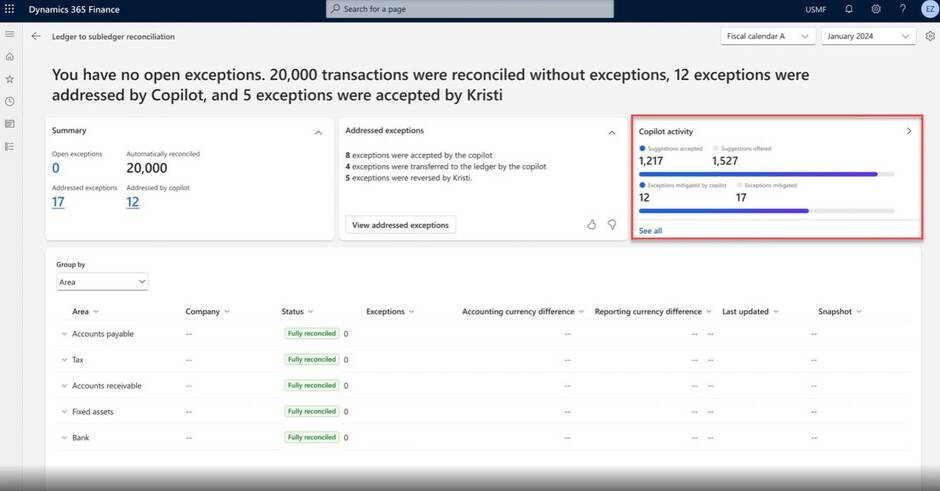
Vision: From Reactive to Proactive ERP
Traditional ERP systems react to user input. The future belongs to proactive systems that anticipate, optimize, and autonomously manage business processes. Copilot for ERP is the first step into this new era of intelligent business software.
Companies from every industry can gain a decisive competitive advantage by using Copilot for ERP, as the solution is tailored to industry-specific requirements, thus offering real added value.
Companies that invest in AI-powered ERP solutions today are positioning themselves for the digital transformation of the next decade. The technology is available, the infrastructure is in place—now it's about strategic implementation and successful integration into the corporate culture.
The future of business processes is intelligent, automated, and human-centric. Copilot for ERP makes this vision a reality, enabling companies to sustainably increase their productivity and competitiveness.