Accounting Software for SMEs

Professional National & International Financial Solutions

Modern Accounting Software Based on Microsoft Dynamics 365 Business Central

The Microsoft Dynamics 365 Business Central accounting software makes financial tasks quick and easy. Automated processes ensure compliant accounting and provide reliability and transparency across your company’s financial data. Avoid errors and save valuable time with the following features, among others:

  • Automated accounts payable workflow
  • Multi‑company capability
  • Multi‑currency and international support
  • Integrated VAT accounting
  • End‑to‑end warehouse management
  • Transparent budgeting and liquidity planning
  • Insightful reporting
TOP features of accounting software

Would you like to learn more about Microsoft Dynamics accounting?

Let our specialists explain all aspects of the accounting functions in Microsoft Dynamics 365 Business Central, expand your accounting knowledge, and gain a clear overview of your income, expenses, and charts of accounts. Tell us about your needs and learn more about our accounting solutions and their features.

Let’s take stock together—for your optimal accounting software. We are happy to help and look forward to hearing from you!

Request a demo

Why Companies Choose a New Accounting Program

Increased efficiency through an automated Accounting Program

Digitizing and automating your financial processes leads to reduced costs and increased efficiency. With the features of our accounting software, you can optimize your workflows: accounts payable workflows, digital invoice dispatch, and currency conversion in accordance with the Federal Tax Administration (FTA) are all handled automatically.

Adapting to New Conditions

The financial accounting solution in Microsoft Dynamics 365 Business Central is future‑proof and supports state‑of‑the‑art technologies that were not available in previous systems.

Secure Financial Accounting

Our modern accounting software enables you to improve the quality, usability, and security of your company’s data. In addition, it allows you to keep track of all income and expenses in a secure accounting environment.

Romano Cavegn
CFO | Exit
„Thanks to the high level of automation provided by Microsoft Dynamics 365 Business Central, we have become more efficient and can now process 150,000 member invoices with just two employees.“

What added value does Microsoft Dynamics accounting software offer?


Stable Business Software und High Performance

A common challenge for SMEs that outgrow their accounting software is a lack of IT stability. The system becomes increasingly slow or processes freeze, frustrating users and compromising data integrity. Typical signs that you are reaching the limits of your existing accounting software include slow report generation, frequent system crashes, and recurring error messages.

Looking for a solution? Our modern accounting program in Microsoft Dynamics 365 Business Central is based on a stable and robust SQL database that is also used by large multinational corporations and is designed to handle high transaction volumes. Small and medium-sized businesses can benefit from this powerful accounting software in a cost‑effective and flexible way.

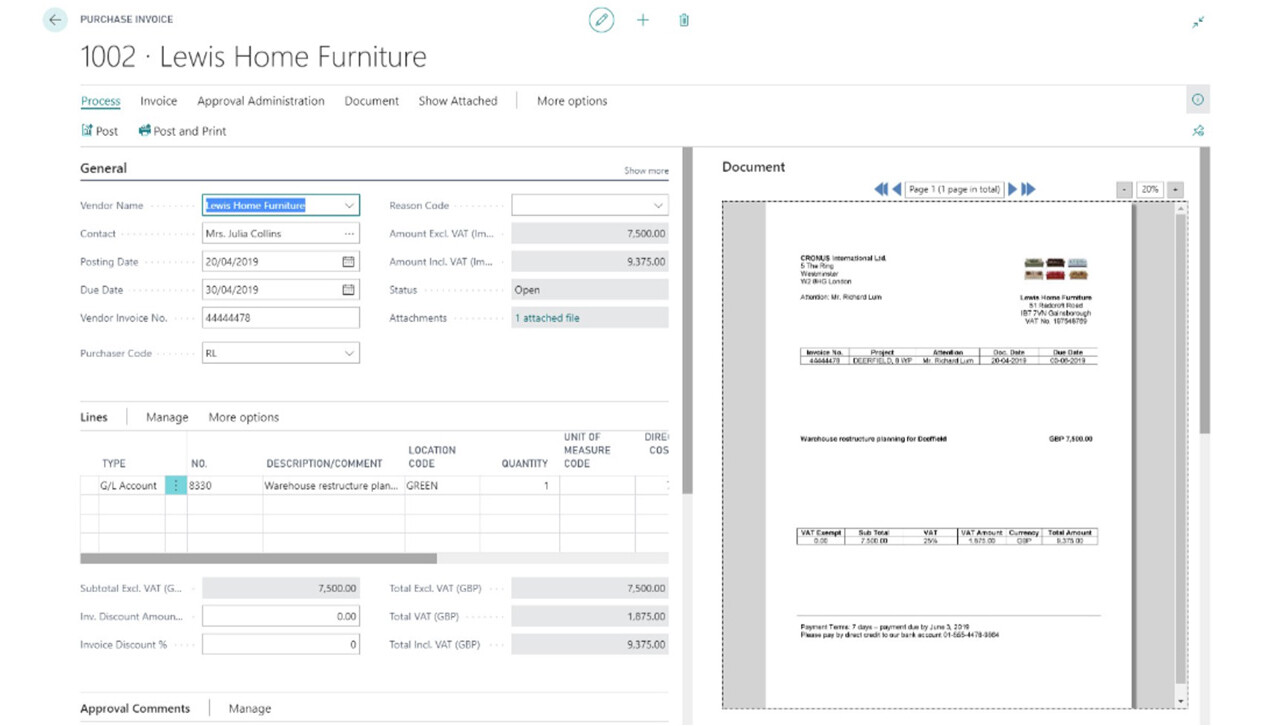
Paperless Office

Processing mostly paper‑based purchase receipts can quickly become an organizational nightmare, especially during periods of growth. The time required increases significantly due to manual invoice entry, invoice tracking and reconciliation, and searching for previous orders and payments.

Thanks to automated accounts payable management seamlessly integrated into Microsoft Dynamics ERP accounting software, paper can be almost completely eliminated. Purchasing teams no longer need to spend hours manually entering invoice data or searching for missing receipts.

Invoices can also be coded either automatically by the system or by the approver within the approval workflow. Precise coding saves SMEs additional time, as accounting entries are automatically assigned to the correct cost centers rather than being processed manually.

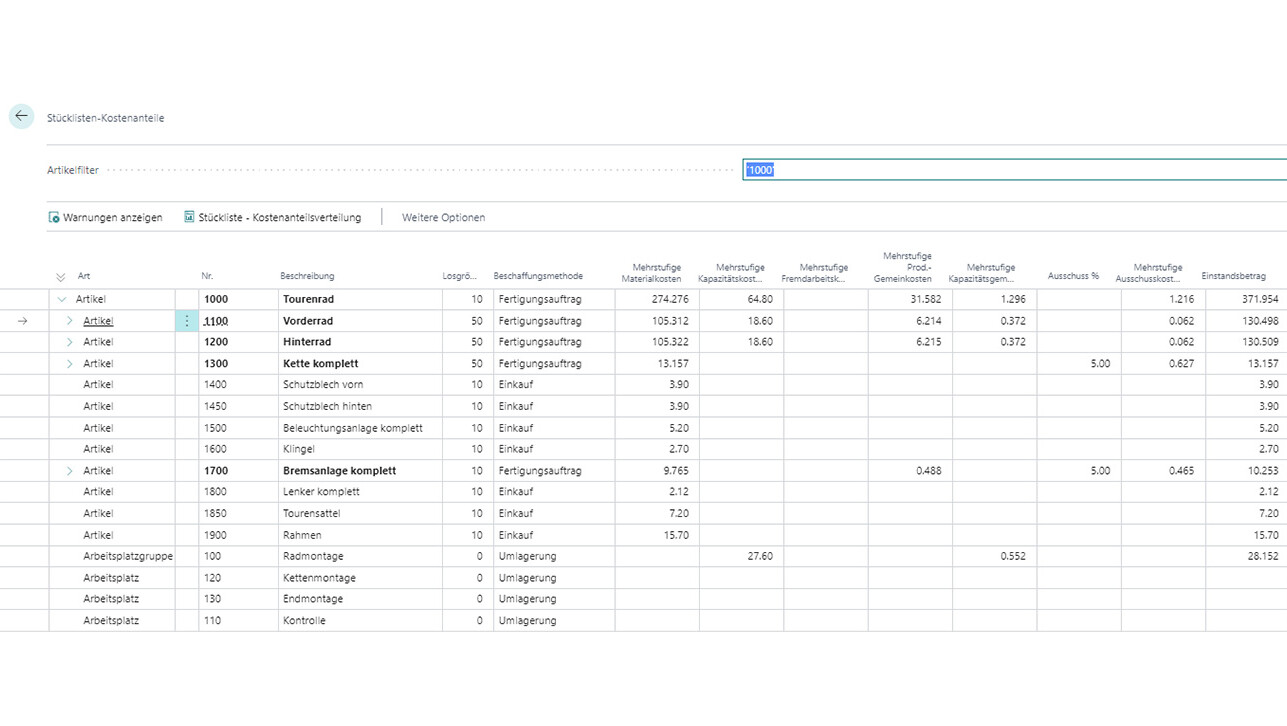
Accurate Cost Calculation

Calculating manufacturing costs can be time‑consuming. It is essential to distinguish between process manufacturing and discrete manufacturing. Many process manufacturers attempt to optimize their operations using software solutions originally designed for discrete manufacturing. However, the significant differences between the two models become most apparent when it comes to cost accounting. Basic accounting and discrete manufacturing systems are often unable to adequately reflect key process parameters or changes to physical assets.

The consequences of inaccurate cost calculations are far‑reaching: lost orders due to excessive cost buffers, high raw material costs caused by insufficient inventory tracking, and time‑consuming manual reporting.

The accounting program from Microsoft Dynamics 365 Business Central, for example, enables the automatic calculation of product costs. This provides real‑time insights into the profitability of individual products within this accounting software. This allows companies to focus on their most profitable items and flexibly adapt their product mix to current and forecast demand.

Automated Report Generation

In the Microsoft Dynamics 365 Business Central accounting program, you can access financial reports at the touch of a button and format them as needed. Automated workflows make it easy for employees to forward reports to internal and external stakeholders and track all approvals centrally. Because everyone involved can rely on accurate figures, there is more time for truly productive activities. Compiling data from multiple sources, the resulting delays, and time‑consuming verification processes are now a thing of the past.

Optimized Warehouse Management

Due to the lack of integration between accounting and e‑commerce systems, inventory data often has to be maintained separately in multiple applications. This is a time‑consuming and error‑prone process that frustrates both employees and customers.

The accounting program from Microsoft Dynamics 365 Business Central enables companies to seamlessly connect financial management with an online portal for wholesale customers. Products, prices, and availability are managed in a central database and updated in real time. This significantly improves customer satisfaction by enabling easy online ordering and also increases overall profitability. In addition, the software provides a complete history of previous purchases and pricing.

Complete and Timely Monthly Closings

Is your business growing rapidly, but your accounting software can’t keep up? These are the risks you may face during monthly closings:

  • Excessively long order processing cycles due to increasing transaction volumes
  • Long turnaround times when documents such as supplier invoices must be retrieved, forwarded, and approved
  • Financial reports and account statements that are already outdated by the time they are published

With Microsoft Dynamics 365 Business Central accounting software, monthly closings can be completed in just a few hours. Automated workflows and centralized document management give managers a comprehensive overview of the business and enable better decisions based on real‑time data.

Reduced Overhead Costs

Are you looking for ways to reduce internal overhead costs? Outdated accounting software often leads to unnecessary expenses—for example, high IT support costs when used by a large number of users. This is compounded by a lack of transparency, difficulties in reporting, and heavy workloads caused by manual multi‑currency reconciliations and consolidations.

Microsoft Dynamics 365 Business Central accounting software provides SMEs with a platform that supports rapid deployment and a lower total cost of ownership. Enhanced functionality, configurable workflows, and advanced reporting capabilities help reduce overhead costs while significantly increasing productivity.

High-Quality Inventory Management

If you use different systems to manage finances and inventory, there is clear potential for optimization. Do you often find yourself constantly monitoring processes due to delays and errors—for example during monthly closings? Is transparency in inter‑branch transfers a challenge for your SME? Then the accounting software from Microsoft Dynamics 365 Business Central can help.

By introducing an RFID system in combination with our accounting software, items and batches can be scanned upon delivery and tracked precisely—both in the central warehouse and across branches. As soon as goods are ordered, all locations are automatically informed, and employees have real‑time visibility into sales and inventory levels. Handheld scanners also provide access to stock levels in other stores, enabling direct deliveries or reservations for customer pickup.

Increased Cash Flow and Revenue

Is there too much time between service delivery and invoicing? As a result, many SMEs struggle with liquidity issues and write‑offs and lack visibility into project performance—both in terms of milestones and profitability.

With Microsoft Dynamics 365 Business Central accounting software, SMEs can centrally manage employee time tracking and travel expense data, significantly shortening the invoicing cycle. Detailed documentation is available at any time, reducing the effort required to respond to customer inquiries about individual invoices. This enables accounting teams to focus on higher‑value tasks, such as assessing project profitability.


Improved Compliance

Do your current accounting systems fail to secure posted transactions for later processing? Is there no complete audit trail? Caution: In such cases, transactions can potentially be removed or manipulated, opening the door to fraud. These issues pose significant challenges for SMEs, particularly when legally required compliance reports cannot be generated. As a result, organizations such as NGOs may fail to meet funding requirements, and the reliability of tax‑relevant documents and processes is compromised.

With Microsoft Dynamics 365 Business Central and the accounting software available in it, SMEs can implement robust control mechanisms to ensure transparency and reliability. Granular, role‑based access ensures that only authorized employees can view or modify specific data. Comprehensive audit trails record the who, what, when, and why of every transaction, significantly strengthening your SME’s compliance posture.

Digital Accounts Payable Workflow with Microsoft Dynamics

Exit

For decades, EXIT has been committed to promoting personal responsibility in the final phase of life and supporting people in difficult situations. With the digital accounts payable workflow in Microsoft Dynamics, EXIT can process accounts payable invoices efficiently and in line with ICS requirements.

our clients
Exit_Logo
Going Global with Microsoft Dynamics

Nexxiot

Nexxiot, an international software company, is transforming the transportation industry with its innovations. The company uses Microsoft Dynamics 365 Business Central for financial accounting.

our clients
Nexxiot_Logo_Quadrat
Unified ERP for Regional Branches

EMS CHEMIE

The EMS Group produces high‑performance polymers and specialty chemicals worldwide. In their search for a standardized ERP system for their global subsidiaries, they chose our solution package.

explore
EMS Chemie ERP
Multi-client capability across the entire holding company

ACE SWISS Holding AG

ACE SWISS Holding AG uses Business Central for financial management across multiple companies in Switzerland.

our clients
ACE_logo

Want to see more projects?

Then click here for our complete reference overview of our ERP, CRM & IT projects.

our clients
ERP_Check-up

What does modern financial accounting offer?

Discover what you can expect from our modern online accounting solution and how your company can benefit below.

General Ledger

The General Ledger provides a transparent and e...

General Ledger

The General Ledger provides a transparent and efficient overview of your accounting in compliance with local and international accounting standards.
User-friendly input screens and a wide range of functions—such as automatic accruals, reversal postings, and posting templates—support daily accounting tasks.
The integrated search function allows you to access related transactions and documents across all modules at any time.

Currency

In addition to the company’s base currency, the...

Currency

In addition to the company’s base currency, the business software supports an unlimited number of foreign currencies for accounting purposes. This enables accounts, customers, and vendors to manage transactions in multiple currencies with ease. Exchange rates can be imported automatically or adjusted manually for valuation purposes. The system automatically processes both realized and unrealized exchange rate differences.

Accounts receivable

With the online accounting module in Microsoft...

Accounts receivable

With the online accounting module in Microsoft Dynamics 365 Business Central, you can manage customer accounts receivable using either the open-item or balance method. Features such as templates, prepayment management, payment processing (including SEPA standards and QR receipts), flexible dunning, configurable workflows, and comprehensive accounts receivable reporting provide the foundation for transparent and efficient receivables management.

Accounts payable

You can manage your accounts payable through an...

Accounts payable

You can manage your accounts payable through an end-to-end, fully digital process, from vendor invoice capture to payment via SEPA payment files. An automated accounts payable workflow enables supplier invoices to be processed and archived with maximum efficiency. This includes OCR recognition, document training, posting and accrual templates, as well as fully configurable electronic approval workflows.

VAT Reporting

You can easily and efficiently manage VAT repor...

VAT Reporting

You can easily and efficiently manage VAT reporting within your accounting system using our software. Our solution includes a flexible VAT management framework for mapping and processing different VAT regimes. It supports both Swiss and a wide range of international tax requirements. Standardized posting and accounting schemes ensure compliant and efficient VAT accounting.

Inventory

Your business software enables consistent and t...

Inventory

Your business software enables consistent and transparent inventory valuation based on standard valuation methods. It also provides comprehensive value flow capabilities for valuation adjustments, target costing, work in progress, material overhead, and multi-level cost structures within accounting.

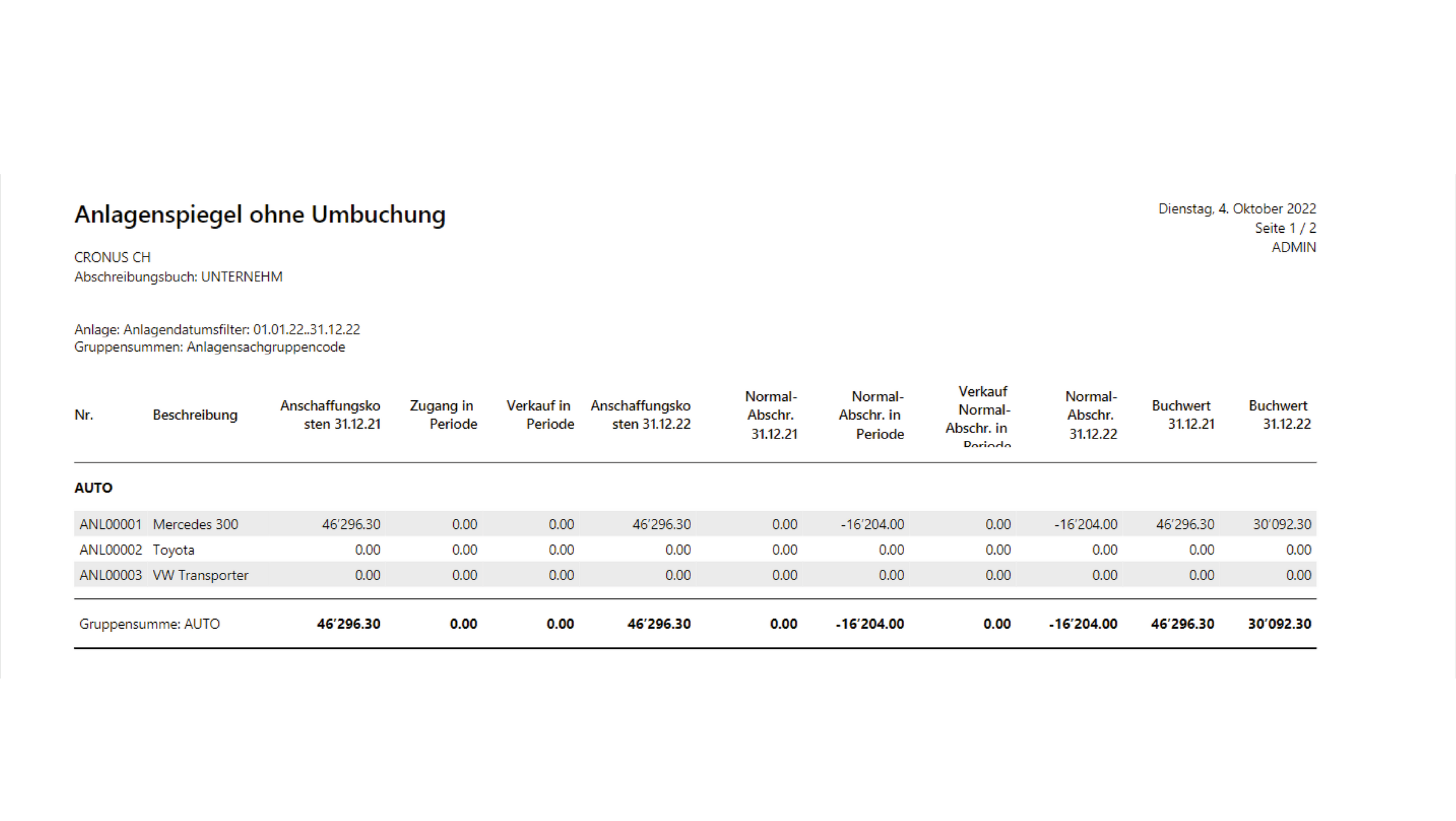
Fixed Assets

The financial accounting solution in Microsoft...

Fixed Assets

The financial accounting solution in Microsoft Dynamics 365 Business Central enables you to manage fixed assets using flexible grouping and hierarchical structures. It supports automatic valuation and depreciation using different methods for the same asset across parallel asset ledgers. This ensures consistent, legally compliant posting flows from acquisition to disposal and allows you to track and manage an asset’s maintenance costs and insurance values.

Cost Accounting

Based on figures from financial accounting, cos...

Cost Accounting

Based on figures from financial accounting, cost accounting enables you to allocate, post, apportion, and analyze costs across cost elements, cost centers, and cost objects.
Static and dynamic allocation keys allow indirect costs to be automatically distributed across the required structures.

Liquidity

Plan your cash flow with full transparency by l...

Liquidity

Plan your cash flow with full transparency by leveraging the data already available in the system, including expected inflows and outflows. Manual cash flow entries and an optional forecast based on Azure Machine Learning models complete the solution’s comprehensive cash flow management capabilities.

Budget

Let’s take a look at budgeting: With Microsoft...

Budget

Let’s take a look at budgeting: With Microsoft Dynamics 365 Business Central, you can easily manage any number of financial budgets, structured by account, period, and analytical dimensions such as cost centers, cost objects, and more. The solution offers comprehensive budget storage as well as powerful Excel import and export capabilities. Advanced analysis features provide a wide range of options for comparing actual figures with budgeted targets.

Analysis by Dimensions

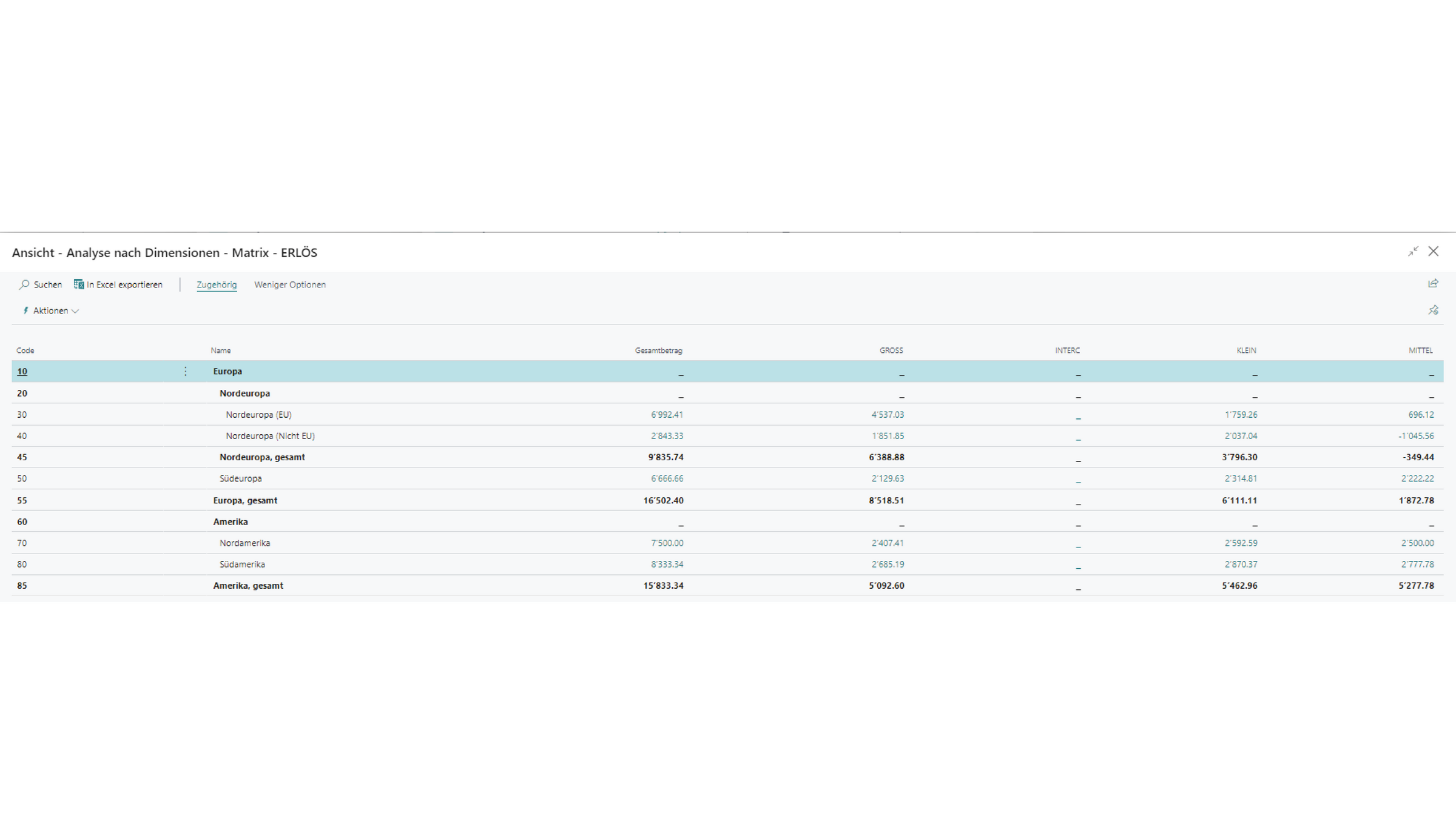
In addition to standard statistics and financia...

Analysis by Dimensions

In addition to standard statistics and financial reports, the software allows you to define any number of analytical structures and apply them consistently across all modules. Standard values and validation rules can be enforced across master data to ensure the consistent use of analytical dimensions. Beyond traditional cost center and cost object structures, this enables you to flexibly map your company’s specific reporting and data analysis requirements.

Reporting

The financial accounting capabilities of Micros...

Reporting

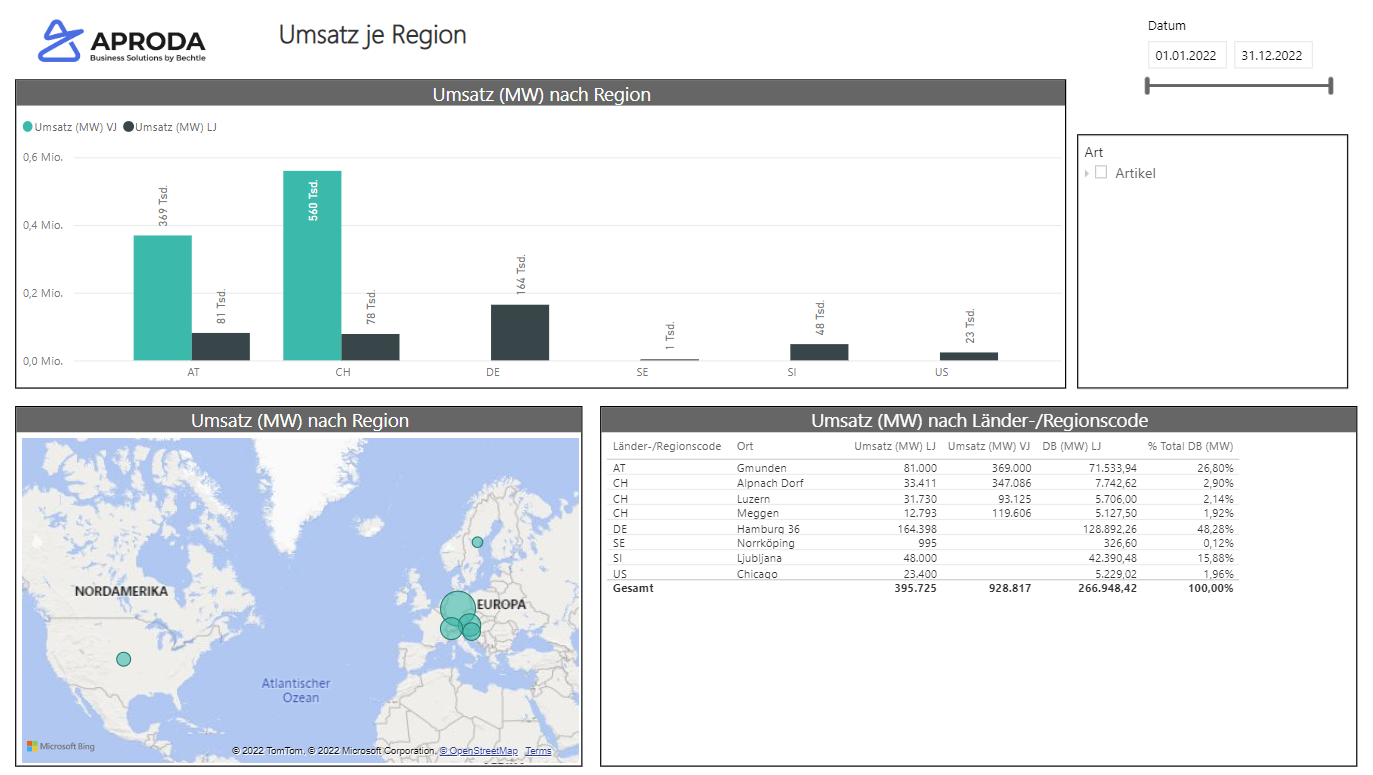
The financial accounting capabilities of Microsoft Dynamics 365 Business Central include a wide range of standard reports as well as fully customizable reporting tables tailored to your business needs. All accounting analyses and reports can be exported to Excel for further processing. For management reporting, the solution integrates seamlessly with Power BI, enabling the creation of dashboards, advanced visualizations, and in-depth analyses.

Which features will benefit you?


Multi-client capability is a key advantage

Multi-tenant capability in accounting software refers to the ability to manage multiple clients or companies within a single software environment. Microsoft Dynamics offers this multi-tenant capability as a core feature for modern accounting requirements.

Thanks to multi-tenant functionality, companies, especially accounting service providers or organizations with multiple subsidiaries, can manage financial data more efficiently. The following multi-tenant features are available in Microsoft Dynamics 365 Business Central:

  1. Data Separation
    Each client operates within its own isolated database or data instance, ensuring that financial data, business transactions, and other relevant information remain strictly separated from other clients.
  2. User Access Control
    The multi-tenant architecture enables role-based access control, allowing data access to be managed according to users’ roles and responsibilities. Each tenant can define its own users, with permissions configured individually.
  3. Consolidation of Reports
    Despite the separation of data, SMEs can consolidate financial reports using Microsoft Dynamics’ multi-tenant capability. This is particularly valuable for companies with subsidiaries or group structures, as it provides a comprehensive view of overall financial performance.
  4. Intercompany Processes
    Microsoft Dynamics 365 Business Central supports intercompany processes, enabling seamless handling of transactions between entities or subsidiaries within the same corporate group. This allows intercompany business transactions and operations to be managed in a simple, transparent, and compliant manner.
  5. Increased Efficiency
    Centralized management of multiple clients enables SMEs to save time and resources. Accounting processes, reporting, and compliance requirements are simplified within a single, integrated software environment.
  6. Adapting to Different Requirements
    Each client may have specific requirements for accounting, reporting, and compliance.
    The multi-client capability of Microsoft Dynamics accounting software allows the solution to be tailored to meet each client’s individual needs.
  7. Scalability
    As your SME grows or expands into new business areas, you can easily add new clients. The multi-client capability ensures a scalable solution that keeps pace with the evolving needs of Swiss SMEs. 

Overall, thanks to its multi-tenant capability, Microsoft Dynamics 365 Business Central provides a flexible and powerful solution for companies that need to manage multiple business units on a single, centralized platform covering all accounting and financial management functions.

Internationality

With an international focus, you benefit from standardized rollouts, enabling you to manage multiple clients using consistent processes and a centralized data repository.
In addition, providers such as Microsoft can adapt localization as required. This includes customers in Germany, Austria, Italy, Spain, China, and the U.S. who use our Swiss accounting software.

Localization ensures compliance with the specific legal, tax, and accounting requirements of each country.
This is essential, as accounting standards, legal regulations, and tax rules can vary significantly between countries.
We help you maintain a clear overview at all times.

These are the key aspects of localization:

  1. Tax adjustments
    Localization involves incorporating the tax laws and regulations of the relevant country. This includes the accurate calculation and reporting of value-added tax (VAT), sales tax, excise tax, and other tax-related requirements.
  2. Legal Compliance
    Every country has its own accounting standards and legal regulations. Accounting software must therefore support localized reporting formats and accounting methods to ensure full legal compliance. 
  3. Currency Management
    Localization also involves handling multiple currencies, particularly in an international business context. Microsoft Dynamics 365 Business Central supports exchange rate management and the accurate processing of foreign currency transactions.
  4. Language Adaptations
    In addition to legal and tax considerations, localization also includes language adaptations. This ensures that the user interface, reports, and documentation are available in the local language, enabling efficient use of the software.
  5. Reporting and Formats
    With a localized accounting solution, you can generate reports and financial documents in accordance with the specific requirements of local tax authorities. This includes the adaptation of balance sheets, income statements, and other statutory reports.

Efficient & User-Friendly Operation

Clear, standardized processes tailored to accounting and financial management help employees work efficiently and productively. Info boxes and role-based views ensure a clean, intuitive interface and a clear overview.

Transparent & Flexible Reporting

Centralized dashboards provide a clear overview of key metrics across multiple clients—making data available at the click of a button and forming the foundation for efficient financial management.

Hub & Spoke

State-of-the-art technologies enable standardized processes and ensure seamless integration of accounting and reporting with the central ERP system based on a hub-and-spoke architecture.

Centralized Customer Database with a 360° View of Your Customers

Stay ahead of the market and stay in tune with your customers. Work with a centralized profile and gain a comprehensive view of your customers, prospects, and partners at the click of a button. This provides a clear and complete overview at all times.

Seamless & Standardized Processes

Intercompany processes, workflows, and an integrated document management system streamline operations and simplify searches. Seamless change management provides clarity and supports effective collaboration across teams.

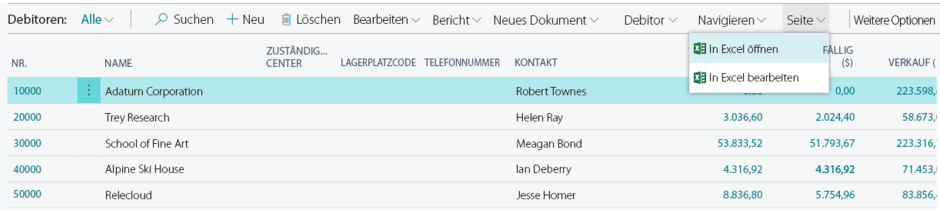
Export to Excel and Re-Import into the ERP Software

For many users, Excel is an indispensable tool for filtering, sorting, comparing, and further analyzing data. In accounting in particular, Excel plays a key role in queries, comparisons, and spreadsheet‑based analyses. This is where the major advantage of Microsoft Dynamics 365 Business Central becomes clear.

With Microsoft Dynamics 365 Business Central, all lists and standard reports can be exported to Excel with a single click and further processed there.

Users can easily edit addresses, products, and items, as well as budget entries and journal entries in accounting. Exporting to Excel even works via copy and paste. After editing, the modified data can be imported back into Microsoft Dynamics 365 Business Central directly from Excel.


BC Export Excel

Filter Options

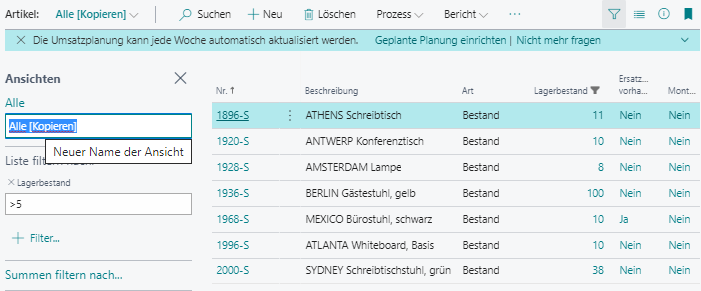
Whether you’re efficiently finding data using the search function, filtering data, or sorting it, the filter functions in Microsoft Dynamics 365 Business Central help you quickly compile accounting reports based on your desired filter criteria, without the need to create a report. These filter views can be saved individually and are accessible to users across your company at any time. This feature helps accounting staff save time every day and work more flexibly, as the ability to quickly find relevant data is crucial to the overall user experience.

Filter Microsoft Dynamics 365 Business Central

Payroll Accounting as Part of the Solution

A large number of companies in the Swiss market are also switching to cloud-based payroll accounting solutions. These forward-looking solutions help SMEs work securely, efficiently, and with ease. In this area, Aproda partners with Swiss Salary 365.

Here are all the benefits for you:

  • You save time on payroll processing, as withholding tax rates are updated automatically. The software supports you every step of the way, from registration to error‑free calculation.
  • You operate in full compliance with the law. In payroll accounting, the latest requirements from various stakeholders are continuously updated automatically.
  • You receive comprehensive reports at the click of a button, helping you maintain a clear overview.
  • Your updates and hotfixes are installed automatically or at the click of a button—no more waiting.
  • Manual data entry is eliminated thanks to integration with ERP financial accounting.
  • You enjoy greater security. Backups updated to the minute allow you to restore your payroll data at any time.

Mobile Access to Your Payroll Accounting

The Microsoft Dynamics 365 Business Central app is available at no additional cost for Android, Windows, and iOS devices. It allows you to stay on top of things anytime, anywhere, while using your familiar Dynamics 365 environment in a modern interface designed specifically for mobile devices.

Convenient Microsoft Office Integration

The integration of interfaces with Microsoft Office products into the Microsoft Dynamics 365 Business Central accounting software enables you to work seamlessly and efficiently. By connecting the accounting program to Office applications such as email, Excel, Word, or Teams, you can easily import, edit, and analyze your financial data. This improves data consistency and significantly reduces manual data entry errors. The integrated interfaces also help generate meaningful reports and facilitate collaboration between different departments by providing a unified platform for financial data sharing.

Here are a few examples of practical integrations with Microsoft products:

  • Automated invoice sending directly via email
  • Importing customer contact information directly from Outlook into the ERP system
  • Viewing and editing invoices in Teams (even simultaneously)

Overall, integrating interfaces with Microsoft Office products helps optimize your business processes, boost productivity, and streamline decision-making for your SME.

Request a Demo now

We will show you our solution for financial management and global ERP. Take advantage of our experts’ knowledge and see how the live system can map your processes along with Microsoft Power BI, one of the most advanced analytics tools available.

Los geht's

Do you have any questions? Find the answers here.

Cloud-based accounting software: What does that mean?

Where traditional accounting software solutions reach their limits, our ERP cloud solutions set a modern standard that grows with your needs from the very beginning. Our ERP cloud solutions were developed specifically for Swiss SMEs and support your business goals.

With our ERP cloud solutions, you can manage your business processes seamlessly and efficiently. At the same time, you benefit from the flexibility and scalability of a stable and secure cloud platform for your accounting.

In these cases, the Microsoft Dynamics 365 Business Central accounting software can help:

  • If you are aiming for international growth.
  • If your outdated accounting software is unstable.
  • If you have to do too much work on paper.
  • If your cost calculations are inaccurate. 
  • If you have to laboriously create reports manually.
  • If you’re struggling with supply chain bottlenecks.
  • If supporting documents for monthly financial statements are missing.
  • If overhead costs are too high.
  • If you are experiencing cash flow and revenue issues.
  • If foreign currencies are causing problems.
  • If you are losing time and money due to inefficient workflows.
  • If your systems lack audit compliance.

Does Microsoft accounting software support double‑entry bookkeeping?

Yes, this software fully supports double-entry bookkeeping, just like most modern accounting systems.

Does the accounting software integrate with my existing ERP system?

Yes, our Microsoft Dynamics accounting software can be easily integrated with your ERP system or industry‑specific solution.

What is digital accounting?

Digital accounting refers to the management of a company’s financial records and bookkeeping using digital accounting software, paperless, organized, audit‑ready, and efficient.

Why choose Microsoft Dynamics 365 for accounting?

One of the key advantages of Microsoft Dynamics software is that it is digital and audit‑compliant. Your accountant can use the solution to support a wide range of tasks. These features include accounts payable workflows, international capabilities, multi‑client support, and excellent usability. The accounting software meets your company’s needs and leaves nothing to be desired. Convinced? Feel free to contact us.

Your contact with us

Lumbardh Vokshi | Solution Sales Specialist

I will be very happy to advise you personally. Give me a call: 058 200 14 14 or send me a message. I look forward to hearing from you!

Contact us
Why Aproda AG

Since 1983, we have been accompanying SMEs on their way to digitalization by transforming our customers' business processes into state-of-the-art software and system solutions. When it comes to implementing the entire IT of SMEs on time and on budget, we are among the best in Switzerland.

Download company brochure
  • Business & technical consulting 
  • Professional competence of our employees
  • Commitment & experience
  • Quality & availability of our support
600
Customers
150
Employees
40
years of experience