

From NAV to Business Central: How to save up to 30% in costs through technical migration
From NAV to Business Central: How to save up to 30% in costs through technical migration
Learn how your company can reduce costs, optimize workflows, and utilize a modern ERP solution from Microsoft by migrating from Navision (formerly Navision Software A/S) to Microsoft Dynamics 365 Business Central. The switch from Dynamics NAV (Navision) to Business Central is more than just an update – it's a strategic move to a contemporary platform with AI-powered features, integrated business solutions, and advantages in daily operations.
Companies that switch from Navision to Microsoft Dynamics 365 Business Central now benefit from higher performance and deeper integration into the Microsoft Dynamics 365 product family.
Thanks to Software as a Service, effort and operating costs are reduced, and updates run automatically. With Business Central, your business software becomes scalable, low-maintenance, and ready for future versions and products from Microsoft – including secure access for teams in Outlook and apps.
Why an ERP system migration from Dynamics NAV to Microsoft Dynamics 365 Business Central is crucial now
Known as Microsoft Dynamics NAV (Navision), it is one of the most successful solutions of the last few decades. Many companies still use older versions of Dynamics NAV (Navision), whose system design no longer fits the modern cloud platform, the new functionalities in Microsoft Dynamics 365 Business, or today's applications.
Switching to Microsoft Dynamics 365 Business Central offers an up-to-date, AI-powered, and scalable ERP solution that improves business processes and sales with an expanded range of functions. You maintain an overview, make informed decisions and reduce costs – 30% from 2026 through Microsoft's Bridge-to-the-Cloud discount.
With Business Central, you secure future-proofing and more flexibility in your work – whether as a Software as a Service or on-premises. For a smooth process, we handle data and integrations in a structured manner and plan clear responsibilities for implementation, operation, and access. To ensure the migration runs smoothly, we divide the project into five clear phases.
These are the five phases:
AS-IS Analysis
AS-IS Analysis & individual migration strategy – We examine your current Dynamics NAV (Navision), identify dependencies, add-ons, interfaces, and much more.
Technical Planning
Technical Planning & Architecture – We design the target structure of your modernized ERP solution, define the system requirements, and consider both Business Central Cloud and on-premises options.
Technical Planning & Architecture – We design the target structure of your modernized ERP solution, select the appropriate operating model, and define the system requirements.
Migration
Migration & Implementation – Using the Microsoft Cloud Migration Tool, we transfer your data from Navision, configure Dynamics 365Business Central, and set up new interfaces.
Testing
Testing & Go-Live Preparation – Intensive tests, monitoring, and performance analyses ensure a successful production launch.
Support
Support & Optimization – After commissioning or go-live, we continue to support you, taking over maintenance, updates, and performance monitoring for your updated ERP.
Phase 1: Technical AS-IS Analysis and Individual Migration Strategy for the Business Software
Every migration to Microsoft Dynamics 365 Business Central begins with a thorough AS-IS analysis of your existing Dynamics NAV (Navision). We take into account your business processes and the current functional scope of your existing business software.
We evaluate:
- Your current system architecture in NAV (C/AL, servers, databases, infrastructure)
- Existing interfaces and integrations
- Add-ons, customizations, and individual applications in the ERP area
- Data volumes, performance, and Microsoft SQL aspects
Based on this, we develop a technical roadmap for your company using our proven transformation concept, including a testing and migration strategy as well as a compatibility check. We document the names, versions, and dependencies of add-ons or industry extensions to ensure a complete transfer to Microsoft Dynamics 365 Business Central.
We discuss your processes in detail, eliminate legacy issues, and consider new requirements as well as future business processes. This gives you a clear overview of the technical and functional components of your Navision solution.
Phase 2: Technical Planning & Architecture
In the second phase, we lay the technical foundation for your new ERP solution.
Based on the AS-IS analysis, we define the target structure of your Business Central architecture and make decisions together.
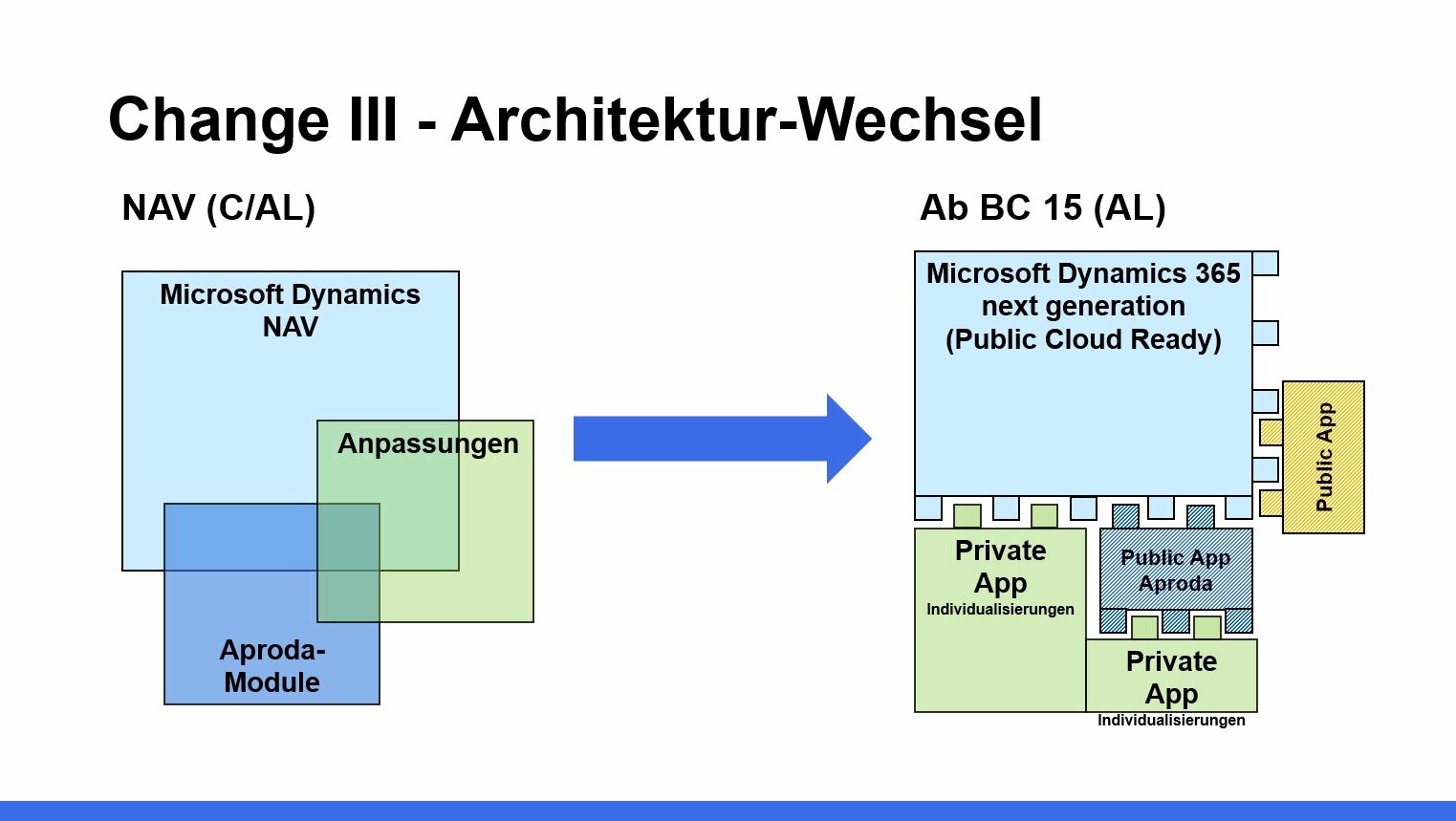
We plan security mechanisms, configure system parameters, and develop a precise concept for interfaces, integrations, extensions (AL extensions), and functions.
Additionally, we define the specific functional scope for each area – from sales to supply chain management – and ensure that every user interface remains intuitive.
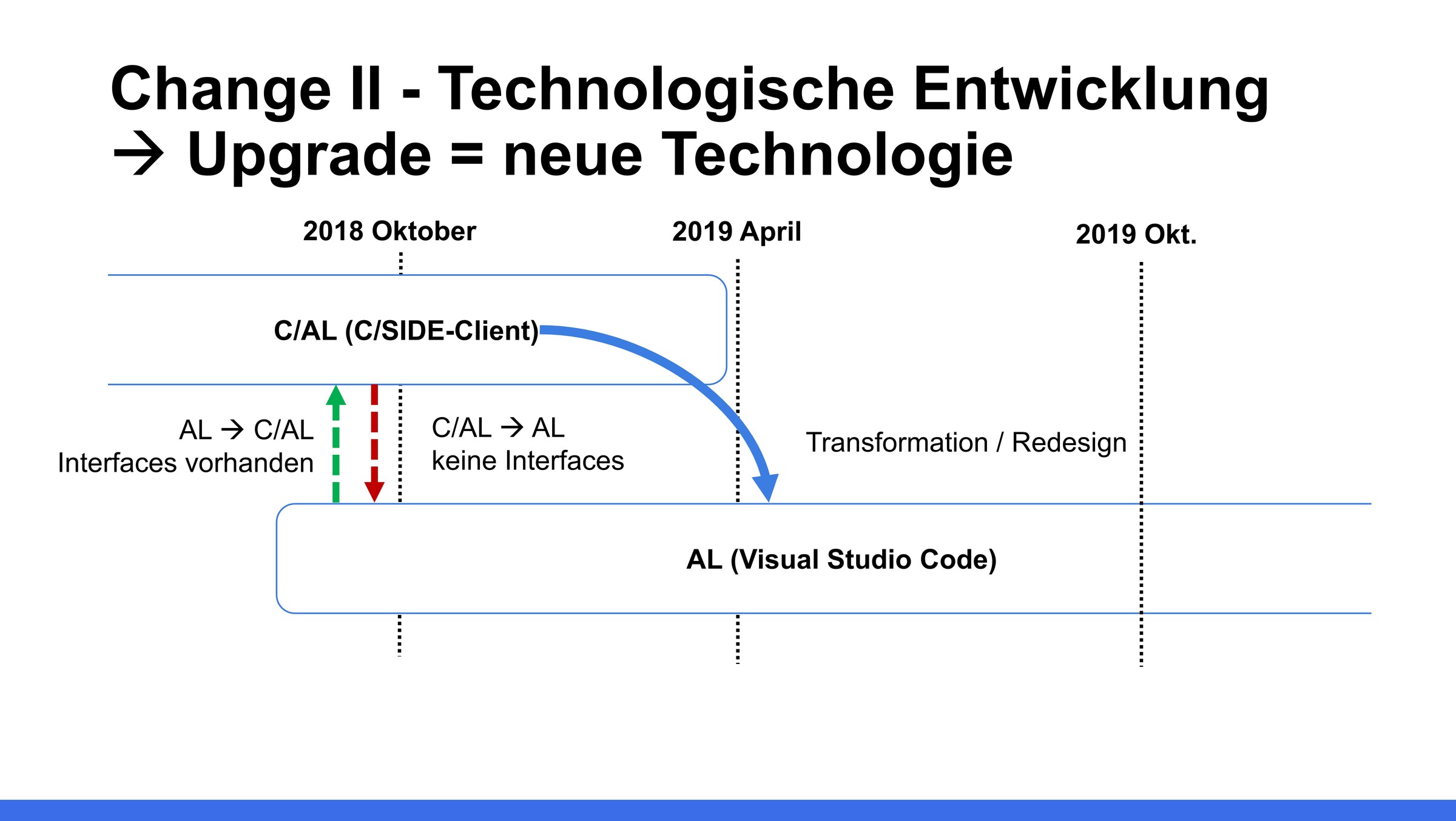
From C/AL to AL: Technical transition to modern Business Central Extensions
With the introduction of AL extensions, Microsoft is replacing classic C/AL development:
- Code analysis in Navision and refactoring in Dynamics 365 Business Central
- Migration of individual customizations into AL extensions
- Setup of a clean Business Central online or local on-prem installation
- Establishment of DevOps workflows and test automation
Our developers work closely with the manufacturer and use best-practice approaches to create stable business software with high performance.
Overview of Navision, Dynamics & NAV Lifecycles: Mainstream Support / Extended Support
In the following table, you will find an overview of how long your current Navision / Dynamics NAV version is still under Mainstream Support or already in Extended Support from Microsoft.
| Product | Mainstream Support | Extended Support |
| 2025 release wave 2, version 27.x | 01.10.2025 | 06.04.2027 |
| 2025 release wave 2, version 26.x | 01.04.2025 | 13.10.2026 |
| 2024 release wave 2, version 25.x | 01.10.2024 | 04.04.2026 |
| 2024 release wave 2, version 24.x | 02.04.2024 | 07.10.2025 |
| 2023 release wave 2, version 23.x | 02.10.2023 | 02.04.2025 |
| 2023 release wave 2, version 22.x | 03.04.2023 | 08.10.2024 |
| 2022 release wave 2, version 21.x | 03.10.2022 | 14.04.2024 |
| 2022 release wave 2, version 20.x | 01.04.2022 | 10.10.2023 |
| 2021 release wave 2, version 19.x | 01.10.2021 | 12.04.2024 |
| 2021 release wave 2, version 18.x | 01.04.2021 | 11.10.2022 |
| 2020 release wave 2, version 17.x | 01.10.2020 | 12.04.2022 |
| 2020 release wave 2, version 16.x | 01.04.2020 | 12.04.2022 |
| 2019 release wave 2, version 15.x | 01.10.2019 | 13.04.2021 |
| Dynamics NAV 2018 | 11.01.2023 | 11.01.2028 |
| Dynamics NAV 2017 | 11.01.2022 | 11.01.2027 |
| Dynamics NAV 2016 | 13.04.2024 | 14.04.2026 |
| Dynamics NAV 2015 | 14.01.2020 | 14.01.2025 |
| Dynamics NAV 2013 RS | 09.01.2028 | 01.10.2023 |
| Dynamics NAV 2009 RS | 13.01.2015 | 14.01.2020 |
| Dynamics NAV 2007 (5.0) | 13.01.2015 | 14.01.2020 |
Phase 3: Migration and Implementation
Your existing Dynamics NAV – also known as Navision system – is technically transferred to Microsoft Dynamics 365 Business Central. Using the Microsoft Migration Tool, we securely transfer master, transactional, and financial data to Business Central.
In parallel, we configure your new instance, set up permissions and processes, and ensure that integrations and functions work together smoothly.
Through close integration with Microsoft Teams, Power BI, Outlook, and other business apps, your business software becomes part of a connected, productive work platform.
The new Copilot in Business Central assists users with routine tasks, suggests posting proposals, and simplifies work in purchasing, sales, and finance. This intelligent use of AI functions increases efficiency and reduces manual errors.
Software as a Service vs. On-Premises: Which option is right for you?
| Variant | Advantages | Challenges |
| BC-Online | Automatic updates, high flexibility, scalability, integration into the Microsoft Dynamics 365 Suite | Dependency on Microsoft availability |
| On-Prem | Full data control, use of existing servers, individual customizations, no subscription commitment | Higher maintenance and update costs |
Our goal is a stable, efficient ERP architecture that maps business processes, supply chain management, finance, marketing, and customer service.
This allows you to benefit from business software that grows with your requirements, supports a wide range of products, and makes work easier.
We advise you on managing your solution, optimal use of availability, and individual industry extensions. Whether it's a Nav migration or a new implementation – our support ensures that everything remains performant, secure, and maintainable.
Data Migration and Migration Tool
We migrate your history, master data, and postings to Business Central in a structured manner – using the Microsoft Migration Tool.
In doing so, we pay attention to:
- Avoiding data silos
- Checking the functional scope
- Monitoring after go-live
Phase 4: Testing & Go-Live
Before your ERP system Microsoft Dynamics 365 Business Central goes live, every component is checked. We conduct unit, integration, and User Acceptance Tests (UAT) to ensure that data flows run without errors and business processes remain stable.
After the testing phase, the go-live follows: your ERP is put into production, and all users switch to the new instance.
With modern Microsoft strategies, Copilot functions, and AI-powered analysis apps, you maintain an overview and make informed decisions.
Interfaces, Integration, and Test Strategy
Modern ERP solutions only work with a well-thought-out integration architecture.
We rebuild your interfaces and connect Business Central with all relevant applications:
- Outlook, Microsoft Teams, Power BI
- External CRM systems, e-commerce shops, or third-party solutions
- Individual business apps of your company and add-ons
Our structured testing strategy ensures that all functionalities – from finance and sales to supply chain management – work smoothly. This creates a fully integrated business software that combines efficiency, transparency, and reliability.
Phase 5: Support & Optimization
After the go-live, the continuous optimization of your ERP solution Microsoft Dynamics 365 Business Central begins. We consider new products, business solutions, AI-based Copilot functions, and industry-specific extensions.
Our support does not end with the go-live – we continue to assist you to optimize your Business Central landscape for the long term and adapt it to the needs of your industries.
Upgrade or New Implementation – which is more economical?
Not every company benefits from a pure upgrade strategy. We compare for you:
- Upgrade: Adoption of existing processes, lower training effort, and quick implementation. Ideal if the existing setup and server infrastructure remain stable.
- New Implementation: Clean architecture, elimination of old structures, optimized performance, and lower maintenance. Perfect for companies that want to modernize their ERP history and build a flexible, future-proof ERP solution.
- Our experts will show you which path is most economical in terms of cost, flexibility, and future security.
- This keeps your system landscape modern, scalable, and ready for future products and versions of Microsoft Dynamics 365 Business Central.
Monitoring, Maintenance, and Support
After the migration, we take over the ongoing monitoring of your systems, check performance and data integrity, and offer proactive maintenance.
Thanks to our many years of experience as a certified Microsoft partner, you benefit from:
- Regular system checks and performance analyses
- Ongoing security and functional updates
- Direct support for technical questions or individual customizations
Thanks to our many years of experience as a certified Microsoft partner, we offer complete support for your ERP instances (NAV and BC), including task automation and reporting. This keeps your Microsoft Dynamics 365 Business Central platform up-to-date, secure, and optimally integrated into your business processes.
Our service portfolio and our wide range of services guarantee sustainable stability and support throughout the entire lifecycle of your ERP solution – from manufacturer updates to strategic further development.
What has changed
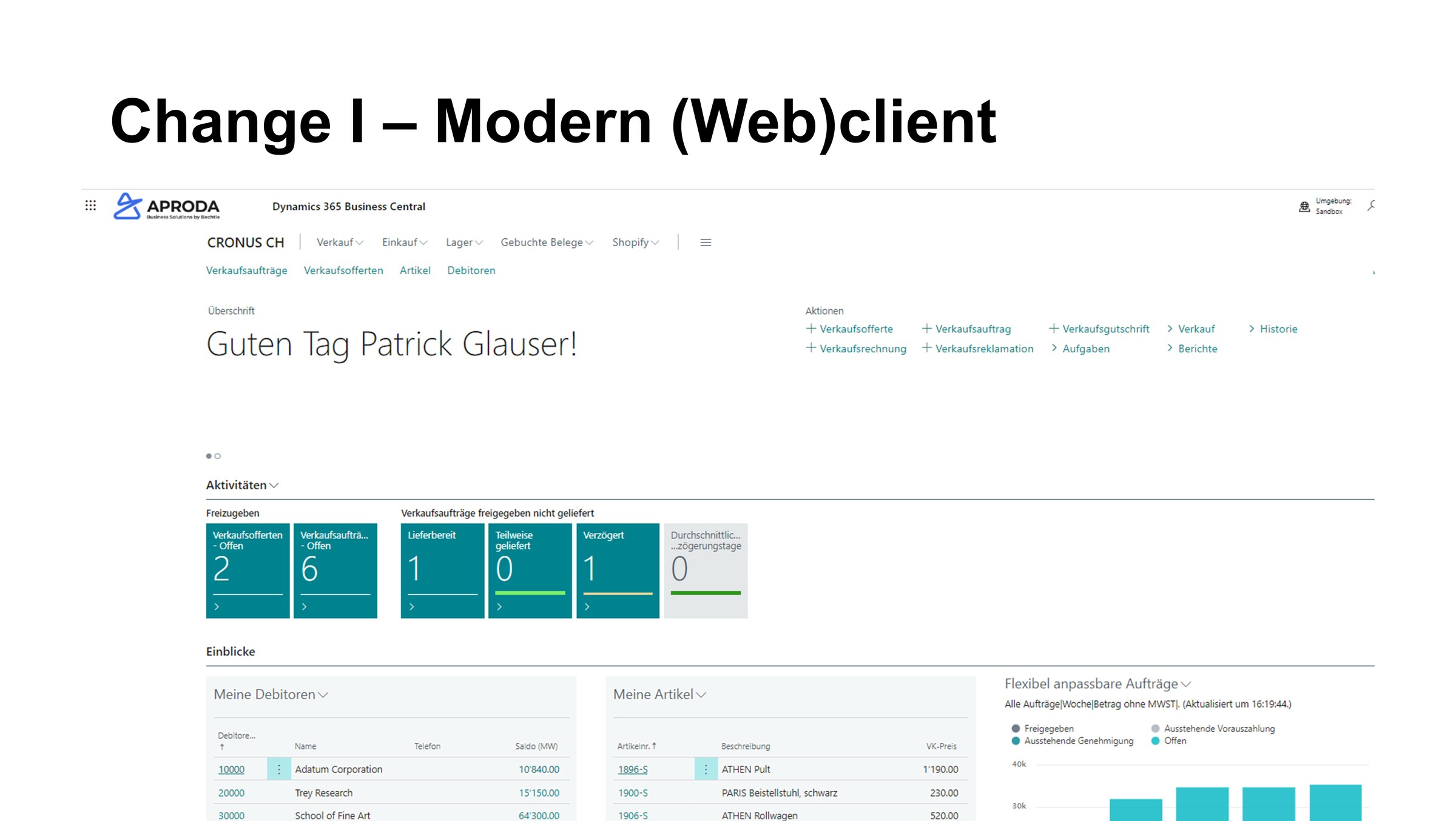
Microsoft is not only continuously modernizing the interface but is also maintaining a future-oriented solution with the modern lifecycle. Users in the cloud can look forward to upgrades with new features and continuously improved security twice a year. In addition, system updates are installed faster and are more user-friendly. And this is precisely where costs are saved.
And for the tech-savvy:
Why Aproda AG is Your Partner for Business Central
With over 20 years of experience in Microsoft ERP systems (NAV and BC), Aproda AG supports companies from various industries in Switzerland on their path to a digital future.
As a certified Microsoft Partner and an experienced manufacturer integrator, we know what matters in modern ERP solutions: scalability, security, easy management, and long-term flexibility.
Our strengths:
- Deep technical expertise in Microsoft Dynamics 365 Business Central and the entire Microsoft Dynamics 365 Business Suite
- Experience with complex system landscapes, hybrid architectures, and individual business solutions
- Focus on cost reduction, efficiency, security, and innovative technologies
- Personal support for implementation, operation, integration, maintenance, and expansion of your ERP environments
- Targeted consulting on new products, Copilot features, industry solutions, and business software
We help your company to specifically leverage the potential of Microsoft Copilot – from automating recurring tasks and intelligent suggestions in sales to optimized business processes.
Our solutions cover finance, supply chain management, and production, offering a clear overview of resources, systems, and workflows.
With Aproda AG, your company benefits from a versatile portfolio and a wide range of services related to Business Central: technical migration, optimization, training, support, and further development. The ERP system combines modern technologies with proven methods – for maximum transparency, stability, and cost-effectiveness.
Secure a 30% discount on Business Central Cloud licenses for your ERP future with Microsoft Dynamics 365 Business Centralfor companies of all sizes from January 1, 2026.
Your Next Steps: Consultation and Contact
By migrating from Navision or Dynamics NAV (NAV) to Microsoft Dynamics 365 Business Central, you create the foundation for modern, automated, and scalable ERP solutions.
Take the opportunity to modernize your business software, expand its functionalities, and fully leverage the advantages of the Microsoft infrastructure – from AI-powered Copilot functions to fully integrated business solutions.
Frequently Asked Questions about Migrating from Navision to Business Central
How long does a technical migration take?
Depending on the complexity, between 4 and 12 weeks – including analysis of Navision (NAV), testing phase, and training in Dynamics 365 Business Central in the new cloud infrastructure.
What happens to my data and user interfaces?
All relevant data, structures, user interfaces, and add-ons are transferred from Navision, checked, and optimized for Microsoft Dynamics 365 Business Central.
What are the costs of a SaaS migration?
In addition to project costs, you benefit from lower maintenance efforts, automatic updates, and up to a 40% discount on Business Central SaaS licenses as part of the Bridge-to-the-Cloud program.
What are the advantages of SaaS over On-Premises?
SaaS with Business Central offers automatic updates, high flexibility, and easy scalability. On-premises is suitable for companies that want to manage their ERP solution locally or need to meet strict compliance requirements.
How does Aproda AG support me after the migration?
We offer continuous support, monitoring, maintenance, and strategic assistance – regardless of whether your ERP environment (Business Central) is operated in the SaaS model or on-premises.
How can I ensure that my Navision history is completely transferred?
Our specialists document all versions, objects, and names from your existing Navision or Dynamics NAV environment (NAV) and guide the transfer to the Business Central software step by step, ensuring no historical data is lost.